

Instant Valuations
Offer free property valuations on your website to capture seller and landlord leads.
Instant Valuations let you offer a free, AI-powered property valuation on your website or as a standalone page. When someone submits their property details, they receive an estimated valuation and you capture them as a lead.
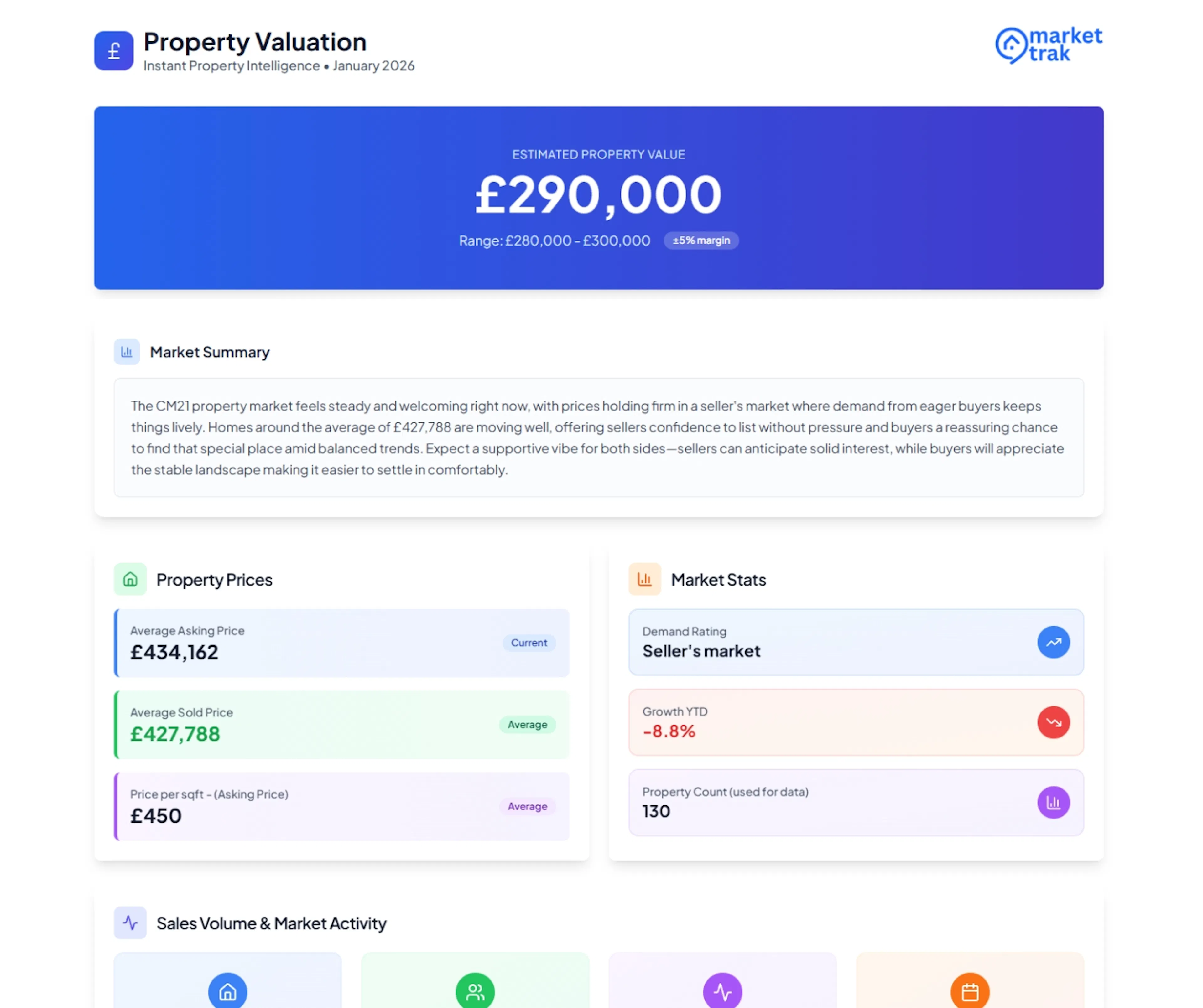
How it works
-
A potential seller or landlord visits your valuation page
-
They enter their property address using the address lookup (Google Places autocomplete)
-
Market Trak fetches real market data for that location
-
An estimated valuation is generated based on comparable properties, market trends, and local data
-
The visitor sees their valuation result
-
Their details are captured as a lead in your workspace
Your valuation page
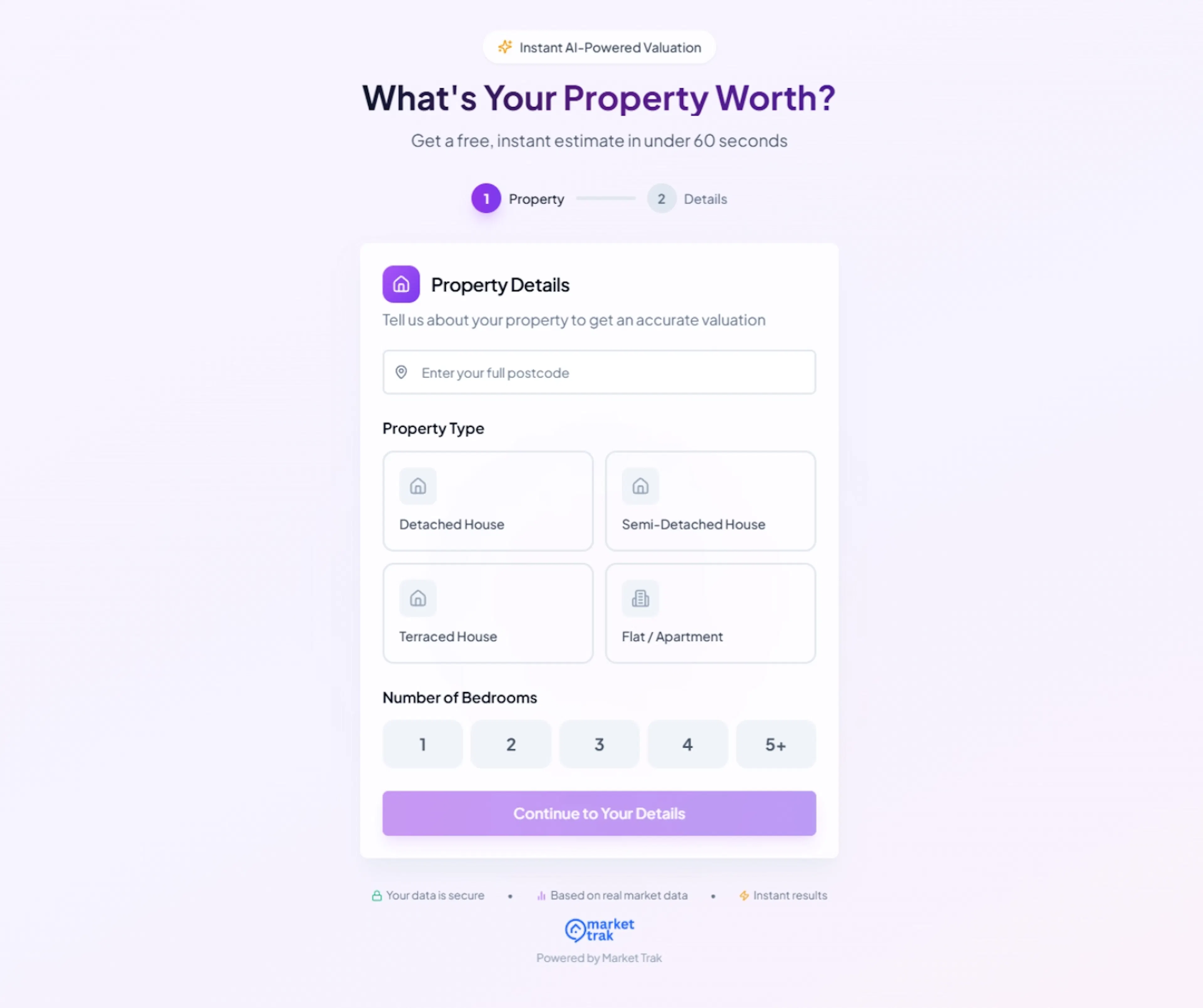
Each workspace gets a unique, public valuation URL that you can share or embed:
https://mtrak.me/valuation/your-workspace-slug
This page requires no authentication, so anyone can access it. You can link to it from your agency website, social media, email signatures, or marketing materials.
Older marketrak.pro/valuation/... links still work and automatically open the same page at its current mtrak.me address.
If you change your workspace slug later, your old valuation link keeps working. Anyone who follows it is sent on to your current address, so cards, email signatures and posts you have already published stay good.
Embedding the form on your website
Instead of linking out to your valuation page, you can embed just the form directly on your own website, styled to your brand, with conversions tracked on your own domain and ad accounts. This is the best option when you're running ads to your own landing page.
Embedding the Valuation Form
Add the form to your own site and track conversions with your own Facebook and Google tags.
What data powers the valuation
The instant valuation blends three or four independent calculations to produce a single headline figure, drawing on:
-
An algorithmic model that values the property based on its size, type, era, and location (property-specific where the UPRN lookup carries data for that exact property, otherwise an area-based model)
-
Price per square foot for the property type in the area, multiplied by the property's floor area
-
The middle price (median) of recent sales of comparable properties of the same type in the area, compounded forward to today using local price growth
-
The property's previous sale price, when available, compounded forward by local growth as an extra anchor
The three or four figures are confidence-weighted and combined into the headline. The range under the headline reflects how closely the methods agree, tight when they cluster, wider when they disagree, capped at ±10% so the headline stays a useful single figure.
The Market Snapshot, Recent Sales, and Price History sections of the report use the same underlying data sources:
-
Average asking prices in the area, filtered to the property type when there's enough data
-
Recent sold prices from Land Registry, filtered to the property type when there's enough data
-
Price trends (rising, falling, stable) year-on-year
-
Demand indicators for the local market
-
Property record (EPC rating, council tax band, last sale price + date) from UPRN when available
Areas we cover
England, Scotland and Wales are covered in full.
Northern Ireland is not covered yet. Its land registry is separate from the Land Registry and Registers of Scotland, so sold prices for Northern Ireland are not published in the data we use, and there are no UPRNs to look an individual address up by. Both of those are what an instant valuation is built on. Someone entering a BT postcode on your valuation page is told plainly that we cannot value there yet, rather than being shown an empty address list. The same applies to market reports and Content Packs.
How we calculated this
The result page includes a quiet "How we calculated this" footer that shows the three or four component figures side-by-side, so a homeowner can see exactly where the headline number came from. Each component shows its raw computed value and a one-line description of where it came from, and the blended headline sits below as the conclusion. It's a transparency feature: it doesn't change the number, it just shows the working.
Confirmation emails
When someone submits a valuation, they automatically receive a branded confirmation email with their valuation details and a link to view it online. The email uses your workspace logo and company name, so it looks like it comes from your agency rather than Market Trak.
Form field settings
You can choose which fields appear on your valuation form. Go to Settings > Lead Capture > Instant Valuation Tool to configure:
-
Email - always required (cannot be turned off)
-
Name - shown by default, can be hidden
-
Phone - hidden by default, can be enabled
This lets you balance lead quality (more fields = more info) against conversion rate (fewer fields = more submissions).
QR code
Each workspace gets a downloadable QR code that links to your permanent valuation page. The QR code is available in your Instant Valuation Tool settings. The link it points to never changes, even if you update your workspace slug, so printed materials stay valid.
Use it on:
-
Window displays
-
Printed flyers and leaflets
-
Business cards
-
For Sale / To Let boards
Lead capture
When someone completes a valuation, their details are captured automatically:
-
Name and email address (from the form, depending on your field settings)
-
Property address (from the address lookup)
-
GDPR consent (collected on the form)
The lead appears in your Leads dashboard immediately. If you have Welcome Emails enabled, they will receive one automatically.
Bot protection
The valuation form includes bot protection to prevent spam submissions. This works automatically and does not require any setup from you.
Sharing your valuation page
You can promote your valuation page through:
-
Your website - add a "Free Valuation" button linking to your valuation URL
-
Social media - share the link in posts and bio
-
Email campaigns - include a valuation CTA in your marketing emails
-
Print materials - use a QR code that links to your valuation page
Tips
-
The valuation page is one of your best lead generation tools, promote it everywhere
-
Follow up quickly on valuation leads, they are actively considering selling or letting
-
Use the AI Assistant to draft personalised follow-up emails based on the valuation data