

Welcome Emails
Automatically send a welcome email to new leads when they are captured.
Welcome emails are sent automatically when a new lead is captured in your workspace. They make a great first impression and let leads know who you are and what to expect.
How it works
When a lead enters your workspace (from a report lead gate, valuation form, or manual entry), Market Trak can automatically send them a welcome email. This happens:
-
On lead creation - for manually added leads or CSV imports (if the welcome email checkbox is ticked when you import).
-
The moment a lead signs up - for leads captured via a public report unlock, an embed signup, or a report email signup. Submission and welcome email happen in a single step.
Instant valuation leads do not get the welcome email. They get a separate branded valuation email with a link back to their result, controlled by its own toggle (see below).
The welcome email is sent as a one-off message, not as part of a campaign.
Enabling or disabling per surface
Each entry point has its own switch in Workspace Settings > Email, on the Welcome & follow-up emails panel at the top of the page. All three default to on. Each switch saves automatically when you flip it.
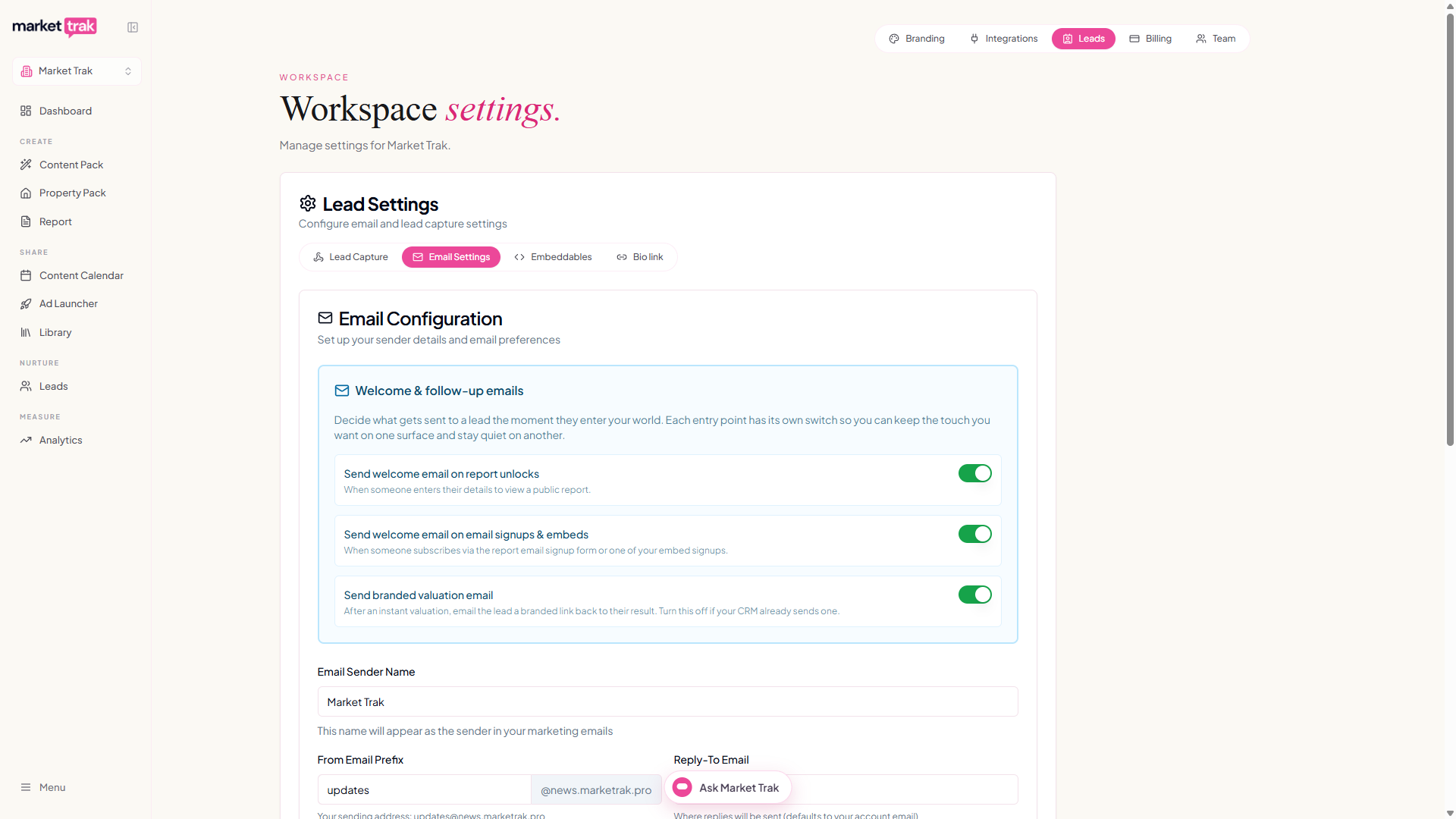
- Send welcome email on report unlocks - when someone enters their details to view a public report.
- Send welcome email on email signups & embeds - when someone subscribes via the report email signup form or one of your embed signups.
- Send branded valuation email - after an instant valuation, email the lead a branded link back to their result. Turn this off if your CRM already sends one.
You can keep the touch you want on one surface and stay quiet on another. For example, send welcomes on report unlocks but stay silent on instant valuations because your CRM handles the follow-up.
The welcome email template
Your workspace has a system-provided welcome email template. This template:
-
Is pre-written with sensible defaults
-
Uses basic personalisation variables
-
Includes a required unsubscribe link for compliance
Available variables
The welcome email supports a limited set of safe variables:
| Variable | What it inserts |
|---|---|
{{lead_name}} | Lead's first name |
{{location}} | The location associated with the lead |
{{workspace_name}} | Your company name |
{{unsubscribe_link}} | Unsubscribe link (required) |
Note: Report-specific variables (like
{{report_link}}or{{averagePrice}}) are not available in welcome emails because the email is sent before a report context exists.
Email delivery
Welcome emails are sent using your workspace's configured email domain. If you have a custom email domain set up, the welcome email comes from your domain. Otherwise, it uses the default Market Trak sending domain.
Tips
-
Keep your welcome email short and friendly
-
Introduce your agency and what the lead can expect to receive
-
Include your contact details so they know how to reach you
-
The welcome email sets the tone for your relationship with the lead, make it count