Where your leads come from
Understand the channel and traffic source labels on each lead, and learn how to tag your ad and post links so the labels are accurate.
Every lead Market Trak captures from a public report or instant valuation is labelled with the channel it came from, for example "Facebook ad", "Google ad", or "Organic search". You can see this on the lead's record, and it is also sent to your CRM.
Want the big picture? The Analytics page (under Measure in the sidebar) totals your leads by channel and campaign in its Every channel and Top campaigns cards, for the 7, 30 or 90 days you pick, so you can see at a glance which marketing is working. This page is about the channel label on each individual lead.
Seeing where a lead came from
Open Leads in the sidebar, then click any lead to open its record. The Where this lead came from section shows:
-
Channel - the friendly, specific label, for example "Facebook ad" or "LinkedIn ad"
-
Traffic source - the broader group it belongs to, for example "Paid Social" or "Organic Search"
-
Campaign - the campaign name, if you tagged the link with one
-
Captured via - which Market Trak form captured the lead (report, valuation, manual, etc.)
-
Landing page and Referrer - the page they arrived on and the site they came from, when known
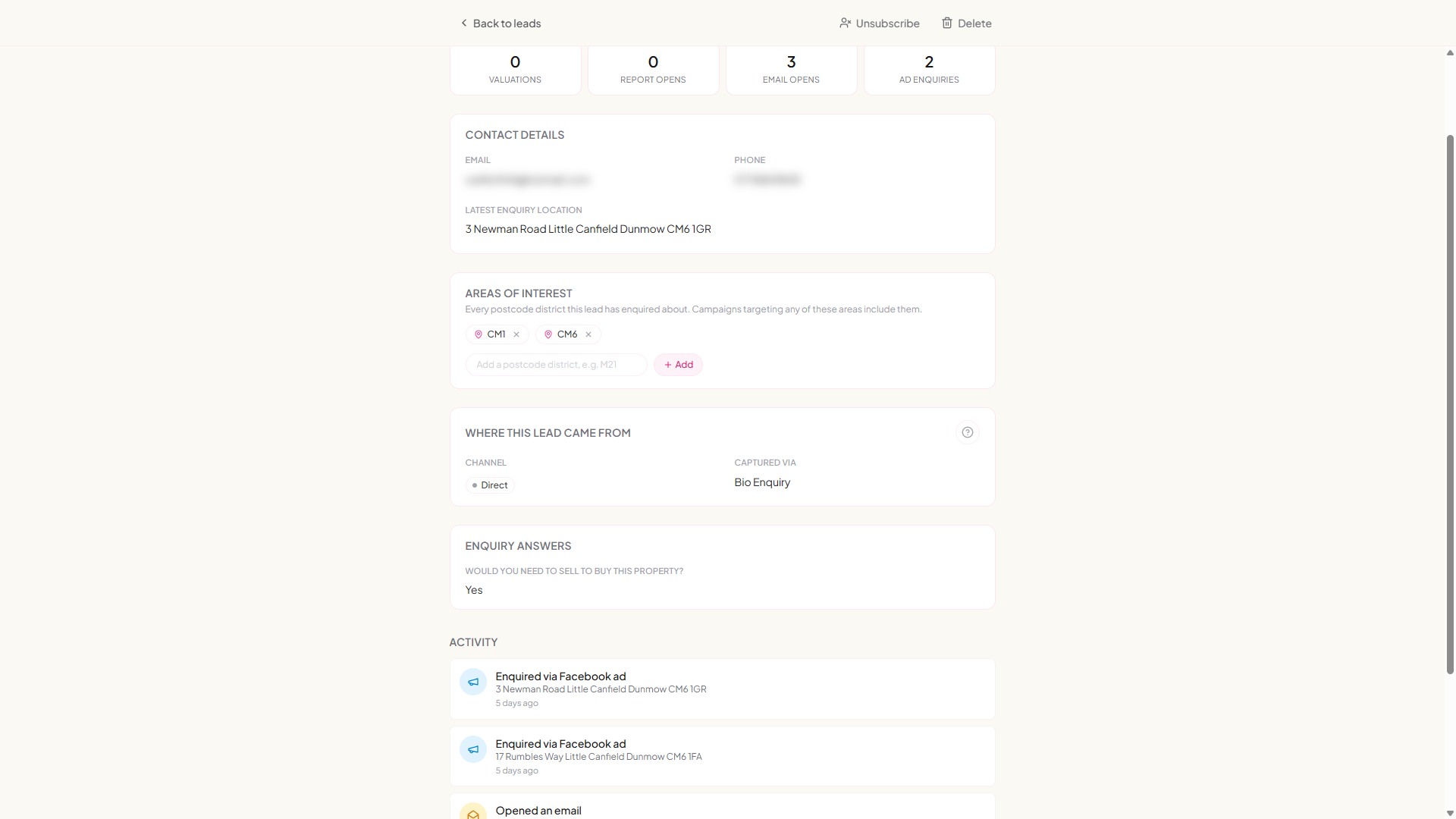
The Source column on the main Leads table shows how the lead entered Market Trak (report, valuation, import). Enquiries from a lead-ad form name the network the form was filled on, so an Instagram enquiry reads "Instagram ad", not "Facebook ad". The channel is the marketing origin, and it lives on the lead record.
What the labels mean
The channel is the specific, readable label:
| Channel | What it means |
|---|---|
| Google ad | Clicked one of your Google Ads |
| Microsoft ad | Clicked a Microsoft / Bing ad |
| Facebook ad, Instagram ad, LinkedIn ad, TikTok ad | Clicked a paid ad on that network |
| Facebook post, Instagram post, LinkedIn post | Came from an unpaid post on that network |
| Organic search | Found you on a search engine without clicking an ad |
| Clicked a link in one of your emails | |
| Referral | Came from another website that links to you |
| Direct | No trail to follow (typed your address, a bookmark, or an untagged link) |
| Added manually, Imported | You added them by hand, or via a CSV import |
The traffic source is the broader bucket the channel sits in. "Paid" always means a paid ad was clicked, "Organic" means unpaid:
| Traffic source | Meaning |
|---|---|
| Paid Google / Paid Microsoft | A paid search ad |
| Paid Social | A paid ad on a social network (Facebook, Instagram, LinkedIn, TikTok). This is never Google. |
| Organic Search | An unpaid visit from a search engine |
| Organic Social | An unpaid social post |
| A link in an email | |
| Referral | Another website |
| Direct | No source could be detected |
Making the labels accurate
The labels are only as good as the links you share. To tell Market Trak where a click came from, add a short tag to the end of your links. These tags are called UTM parameters:
-
utm_sourceis the platform (for examplefacebook,linkedin,email) -
utm_mediumis the type (for examplepaidfor ads,socialfor organic posts)
| Where the link is used | Add this to the end of your link |
|---|---|
| Facebook ad | ?utm_source=facebook&utm_medium=paid |
| Instagram ad | ?utm_source=instagram&utm_medium=paid |
| LinkedIn ad | ?utm_source=linkedin&utm_medium=paid |
| Organic social post | ?utm_source=facebook&utm_medium=social |
| Email link | ?utm_source=email&utm_medium=email |
| Google or Microsoft ad | Turn on auto-tagging in Google Ads / Microsoft Ads (no manual tag needed) |
So a tagged Facebook ad link to your valuation page would look like:
https://mtrak.me/valuation/your-agency?utm_source=facebook&utm_medium=paid&utm_campaign=spring-valuations
Add utm_campaign=your-campaign-name too, and the campaign name shows on the lead record so you can tell which advert or post brought each lead in.
Tag Instagram links with utm_source=instagram, not utm_source=facebook. The label follows the tag, so an Instagram ad tagged as Facebook reads "Facebook ad" on every lead it brings in. Property ads you launch from Market Trak tag themselves correctly, so this only applies to links you share yourself.
Without a tag, a Facebook ad click often carries no clear marketing signal, so it can be labelled "Direct" or treated as an organic post. Tagging your ad and post links is what makes the channels reliable. Google and Microsoft ads tag themselves automatically once auto-tagging is on.
If your ads go through your own website first
A common setup is: your ad points to a page on your own website, and a button there sends people to your Market Trak valuation or report. There is a catch: the ad's tags land on your website's address, and they are not carried across automatically when someone clicks through to Market Trak. Without help, those leads show as "Referral" (from your own site) instead of the real ad.
Two ways to keep the tracking:
Best: point the ad straight at Market Trak
Put your Market Trak link (with the UTM tags on it) directly in the ad, skipping the in-between page. Nothing is lost.
Keep your landing page: add this snippet
If you want visitors to land on your own page first, add this to that page (the one your ad points to, not Market Trak). Paste it in the footer, just before the closing </body> tag, or in your website builder's "footer code" or "code injection" slot. It copies the ad's tags onto any link that points to Market Trak, so the tracking rides through.
<!-- Market Trak link tracking. Paste before </body>. -->
<script>
(function () {
  // Domains whose links should carry your ad tags. Add a custom domain here later if you ever use one.
  var HOSTS = ['marketrak.pro'];
  var TRACK = ['utm_source','utm_medium','utm_campaign','utm_term','utm_content','gclid','fbclid','msclkid','igsh','igshid','ttclid'];
  var here = new URLSearchParams(window.location.search);
  var pass = [];
  TRACK.forEach(function (k) { var v = here.get(k); if (v) pass.push([k, v]); });
  var ref = document.referrer || '';
  function isTarget(host) {
    return HOSTS.some(function (h) { return host === h || host.endsWith('.' + h); });
  }
  function decorate(a) {
    try {
      var url = new URL(a.href, window.location.href);
      if (!isTarget(url.hostname)) return;
      pass.forEach(function (kv) { if (!url.searchParams.has(kv[0])) url.searchParams.set(kv[0], kv[1]); });
      if (ref && !url.searchParams.has('mt_referrer')) url.searchParams.set('mt_referrer', ref);
      a.href = url.toString();
    } catch (e) {}
  }
  function run() { Array.prototype.forEach.call(document.querySelectorAll('a[href]'), decorate); }
  if (document.readyState !== 'loading') run(); else document.addEventListener('DOMContentLoaded', run);
})();
</script>
Put it on the page your ad lands on (the one with the button to Market Trak), in the footer. It is not a tracking pixel and sends no data of its own, so it sits alongside your Facebook and Google tags rather than replacing them. If your valuation or report tools ever move to a custom domain, add that domain to the HOSTS line.
Using the embedded form instead of a button? The valuation and signup embeds already do this for you, on any domain. Just re-copy the latest embed code from your dashboard, and keep the <script> part that comes with it.
Channels in your CRM
If you forward leads to a CRM with the lead capture webhook, the data now includes a ready-made channel field ("Facebook ad", "Google ad", and so on) alongside the raw utm_source, utm_medium, and utm_campaign values. Map the channel field in your CRM to see the same friendly label there.