

How Credits Work
Understand the credit system, how credits are consumed, and how to manage your balance.
Market Trak uses a credit system to meter usage of AI-powered features. Each action that uses AI consumes a certain number of credits from your workspace balance.
Billing modes
Your workspace operates in one of two billing modes:
Credits mode
-
You receive a monthly credit allowance based on your subscription tier
-
Credits are deducted as you use features
-
Your balance resets at the start of each billing cycle
-
You can purchase additional credits if you run out before your reset date
Limits mode
-
Instead of credits, your plan sets fixed monthly limits for specific actions (reports, emails, contacts)
-
Usage is tracked against these limits
-
Limits reset monthly
Most workspaces use credits mode. Your mode is determined by your subscription tier.
Credit costs
Different actions consume different amounts of credits:
| Action | Credit cost |
|---|---|
| Generate a report | 20 Credits |
| Generate an AI image | 20 Credits |
| Re-Generate an AI image | 10 Credits |
| Edit an AI image | 5 Credits |
| Property feed post (auto-generated) | 5 Credits |
| Instant Valuation | 20 Credits |
| Email campaign | 3 credits for every 10 emails (min 3) |
Credit costs are configured centrally and may be adjusted. The current costs are always reflected in the app when you perform an action.
Checking your balance
Your current credit balance stays visible while you work:
-
Desktop: a coin icon and your balance sit above Menu at the bottom of the sidebar; hover over them to see the full meter
-
Mobile: open Account and scroll to the compact credit row above Sign out; tap it to expand the allowance details and actions
-
Billing:
Workspace settings > Billingshows the Current Balance card with your allowance, reset date and Buy More Credits button -
The Assistant: ask "What's my credit balance?" from anywhere in the app and it looks it up for you
The bar is full when your included allowance is full and shrinks as credits are used. The coin, balance and bar are green above a quarter remaining, amber at a quarter or less, and red at 100 credits or fewer. The amount remaining is shown once, without a duplicate percentage label. Trial owners always see Upgrade for more credits because trial workspaces cannot buy credit packs. Paying owners see no action while green; from amber onwards they can open Buy more credits, plus Upgrade for more credits when another plan carries a larger monthly allowance.
Trial credits
The 14-day trial includes 500 creation credits. Trial credits do not reset. If you use them all before the 14 days finish, actions that need credits pause until you choose a plan; everything you have already made stays in your account.
Monthly reset
Your credit balance resets to your plan's full allowance at the start of each billing cycle. Unused credits do not roll over to the next month.
Buying additional credits
If you try an action that needs more credits than you have left, Market Trak opens the next step for you: a Buy Credits window if you are on a plan, or your upgrade options if you are on a trial (trial users cannot purchase additional credits, but subscribing unlocks your plan's full monthly allowance straight away).
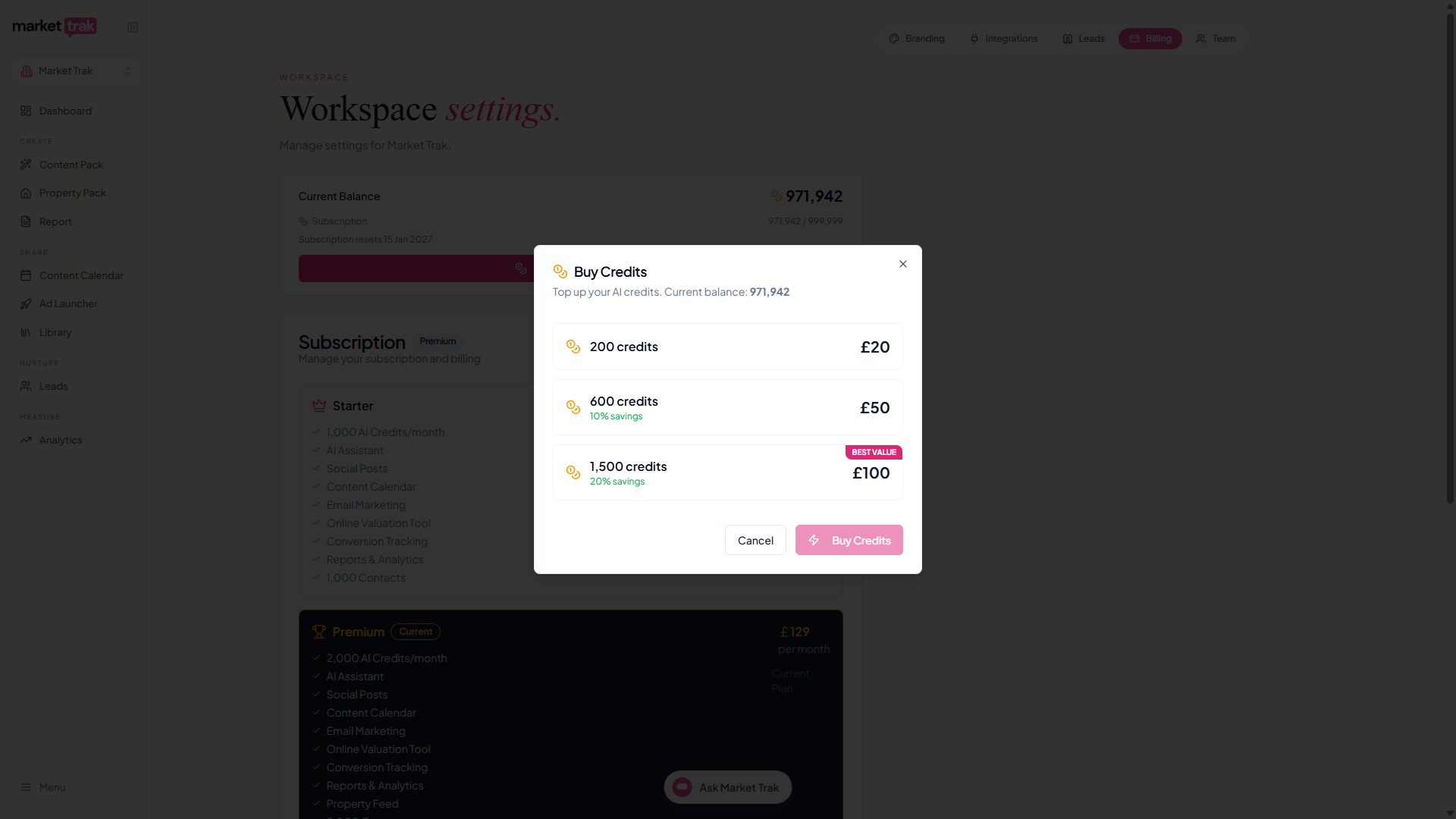
You can also top up at any time before you run out:
-
Click Buy More Credits on the Current Balance card at
Workspace settings > Billing -
Choose a credit pack
-
Complete the purchase through Stripe
-
Credits are added to your balance immediately
What happens to scheduled posts
A post that comes due while your balance is empty is not lost and is not marked as failed. It stays on your calendar as Waiting for credits, shown in amber, and publishes on its own as soon as you top up.
The one limit is time: if the post's date and time passed more than a day ago, it stops publishing on its own and shows as Missed instead. Pick a new date to send it. See Scheduling and publishing.
Low credit notifications
The in-app meter turns amber when a quarter remains and red at 100 credits or fewer. At approximately 10% of your monthly allowance, you will also receive a notification if enabled in your notification preferences. This gives you time to either:
-
Slow down usage until your reset date
-
Purchase additional credits
-
Upgrade to a higher plan with a larger allowance
Credit tips
-
Plan your content calendar - knowing your monthly credit budget helps you spread usage evenly
-
Use templates - social media templates and email templates do not cost credits (only AI generation does)
-
Monitor the usage bar - check it periodically to avoid running out at a critical moment
-
Property feed awareness - if you have an active property feed, each new listing costs 5 credits for auto-post generation. A busy CRM can consume credits quickly