Navigating the App
Learn your way around Market Trak: the sidebar on a computer, and the five-tab app on your phone.
Market Trak has a clean, sidebar-driven layout that keeps every feature one click away.
Sidebar navigation
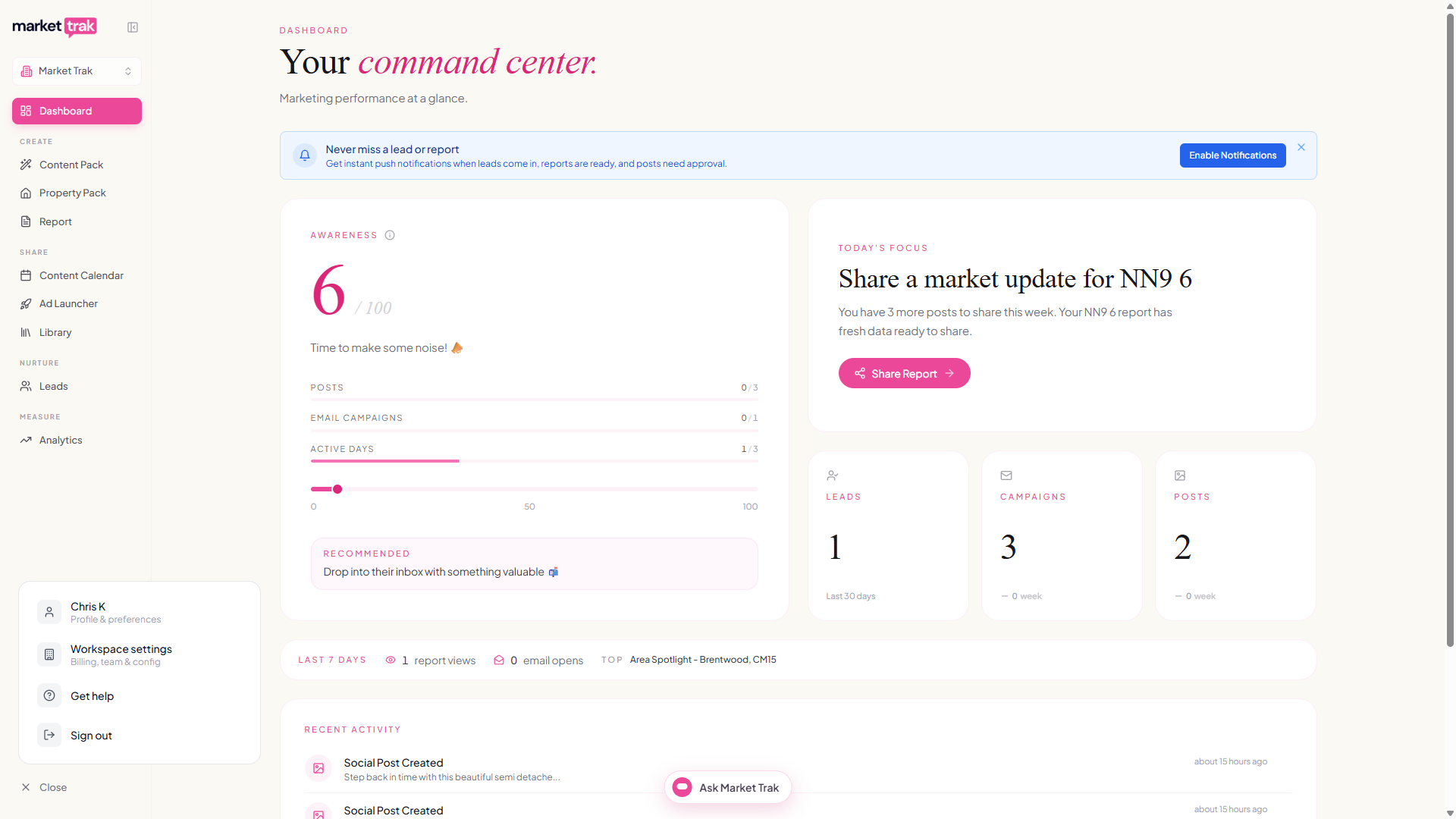
The sidebar on the left is your main navigation. Dashboard sits at the top, and the rest of your tools are grouped to follow your workflow: Create your content, Share it, Nurture the people it brings in, then Measure how it is all performing. The AI Assistant is not a sidebar destination: it travels with you as the Ask Market Trak button at the bottom centre of every page (see the assistant overview).
| Group | Item | Description |
|---|---|---|
| Top | Dashboard | Your command centre with metrics, awareness score, and quick wins |
| Create | Swipes | A small deck of ready posts every day: keep, save or pass. The card is pink while there are swipes waiting and white once you have done today's |
| Create | Content Packs | Generate a ready-to-use set of posts plus a report for an area you cover |
| Create | Reports | Generate, view, edit, and share property market reports |
| Create | Social Posts | Create and manage your social media content |
| Share | Content Calendar | Plan and schedule your posts across the week and month |
| Share | Ad Launcher | Launch a Facebook or Instagram lead ad for a property |
| Nurture | Leads | Manage captured leads and run email campaigns |
| Measure | Analytics | See your report engagement, email opens, and where your leads come from |
Some items may show a lock icon if they need a higher subscription tier, and the Ad Launcher appears once advertising is enabled for your workspace.
Collapsing the sidebar
Click Collapse at the top of the sidebar (next to the logo)to shrink it to icons only. Click the expand arrow to bring it back. Your preference is remembered.
Profile menu
Click your profile icon at the bottom of the sidebar to open a popover with:
-
Profile & preferences - your personal details and notification preferences
-
Workspace settings - branding, integrations, leads, billing, and team (subscription management and credit purchases live on the Billing tab)
-
Get help - opens live chat support
-
Sign out
On your phone
Your phone gets its own app rather than a shrunken version of the sidebar. A bar across the bottom holds five places, and your initials sit in the top-right corner.
| Tab | What is there |
|---|---|
| Today | Your dashboard: what to do next, today's swipes, your numbers and what has just happened |
| Content | Everything you make: Swipes, Content Pack, Property Pack, Report and, on plans that have it, the Ad Launcher |
| Assistant | The round pink button in the middle. It opens over whatever you are looking at, so you never lose your place |
| Share | Your calendar for the week, anything waiting for approval, and your library of packs, reports and posts |
| People | Everyone you have captured, plus importing, exporting and sending a campaign |
Two of these are named differently on a computer: Today is the Dashboard and People is Leads. They are the same pages.
Gestures
- Pull any screen down to refresh what is on it.
- Drag a person's row to the left to email or delete them.
- Press and hold a person, a saved post or a report to start selecting several at once, then tap the others to add them. A bar appears at the bottom with what you can do.
Your account and settings
Tap your initials in the top-right corner to open Account. Everything is in one list, grouped by what things are:
- Capturing leads - your Bio link, Embeddables, Lead capture and Email settings. The first two are things you hand to other people, which is why they have their own entries rather than sitting inside a settings tab.
- Workspace - Brand & logo, Integrations, your team, Billing and Plans.
- Account - your profile, Assistant memory, and help.
Tap Offices on the same screen to switch between workspaces or add a new one.
A few things are kept to a computer on purpose. Writing an email template involves a lot of fiddly text and merge fields, so tapping Email templates on a phone takes you to your campaigns instead. You can still choose any template when you send a campaign from your phone.
Locked features
If a sidebar item shows a lock icon, it means your current plan does not include that feature. Click through to see upgrade options, or visit Billing to change your plan.