

Billing
Manage your subscription, upgrade or downgrade your plan, buy credits, and access the customer portal.
Market Trak uses a subscription model with tiered plans. Each plan includes a set of features, usage limits, and a monthly credit allowance.
Accessing billing
On a computer, open Menu at the bottom of the sidebar, choose Settings, then Billing. On your phone, open Account and choose Billing. Only the workspace owner and Market Trak admins can open workspace billing.
If you are on a paid plan, the page shows the plan you are on and the price you are actually paying, with any discount named beside it. Click What your plan includes to open the full list. Down the side sit your credits, how you pay, and cancelling. Your invoices are listed underneath, five at a time, with Show more for older ones and a link to download each one.
If you are on a trial or the free plan, you see the plans instead, because choosing one is what you are there for.
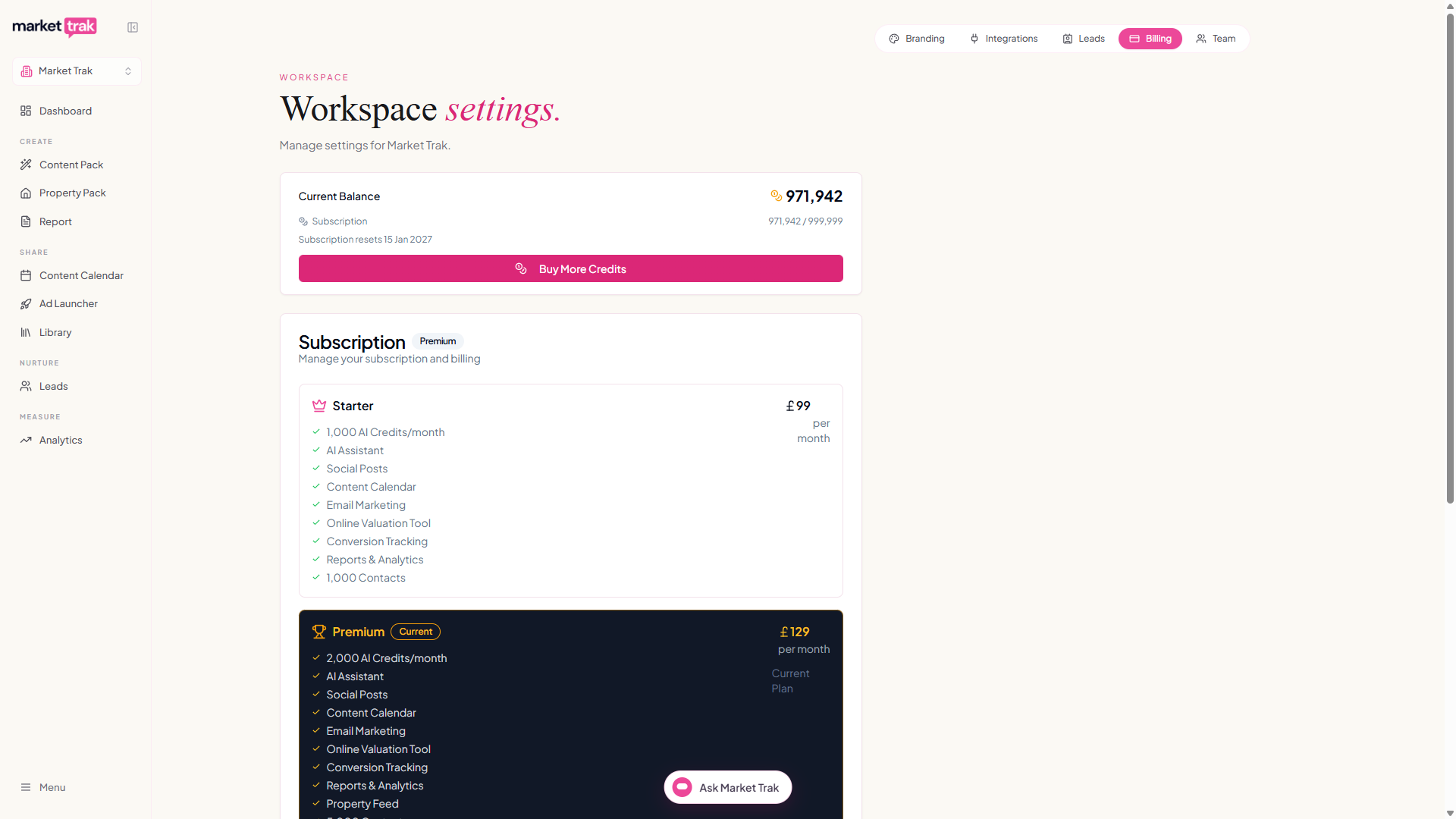
Subscription plans
Market Trak offers three subscription tiers:
| Tier | Target |
|---|---|
| Starter | For smaller agencies getting started building their content foundation |
| Premium | For agents who want automated property feed and content scheduling |
| Ultimate | For high-volume agents who need higher limits |
Each tier includes progressively more features, higher limits, and larger credit allowances. Annual billing is also available at a discount. Visit the Pricing page for full plan details and feature comparisons.
Managing your subscription
Upgrading
-
Go to Billing
-
Click Upgrade
-
Select your new plan
-
Complete the Stripe checkout
-
Your new features are available immediately
When you upgrade mid-cycle, you are charged a prorated amount for the remainder of the billing period.
You can also upgrade without coming here first. If you reach a feature your plan does not include, or you run out of credits mid-task, the plans open in the app with your current plan marked and the ones below it greyed out, so you can move up and carry on where you left off. Downgrades and cancellations always happen on this page.
Downgrading
-
Go to Billing
-
Click Change plan
-
Choose the smaller plan
-
Check the summary, then confirm
The summary names the date the change happens, which is the end of the period you have already paid for, what you would lose, and any allowance that gets smaller, with the old and new figures side by side.
Nothing changes on the day you choose it. You keep everything you have until the date on that screen, and your billing page shows a note naming the plan and the date until the change lands. Only one change can be pending at a time, so if you want to choose differently, message us and we will sort it.
If you are on a discounted rate, the screen tells you that moving down ends it and you go onto the smaller plan's standard price.
Smaller limits never delete anything. If you have more contacts than the new plan holds, you keep every one of them; new leads simply stop being saved until you are back under the limit, and the screen tells you if that applies to you.
If you hold more postcode areas than the new plan covers, the confirmation asks you to pick which ones keep working before it will go ahead. The rest are switched off, not removed: they stay on your account and come back the moment your plan covers them again. You can change your mind later from Billing, using Choose which areas stay on.
If you downgrade below your current usage (e.g. more active reports than the new plan allows), you will need to reduce usage before the new limits apply.
Cancelling
-
Go to Billing
-
Click Cancel Subscription
-
Confirm the cancellation
After cancelling:
-
We email you a confirmation straight away, naming the date your access ends
-
Your subscription remains active until the end of the current billing period
-
You retain access to all features until then
-
After the period ends, your account is restricted. We reserve the right to delete it if not reactivated within 6 months.
The free trial works differently: it has no card on file and nothing to cancel. It simply ends on its end date and your account returns to the free plan, with everything you made still in your account. See Your 14-Day Free Trial.
How you pay
The Payment card names what pays for your subscription. That may be a card, in which case it shows the brand, the last four digits and the expiry date, or it may be Link, PayPal or a direct debit, in which case it names that instead.
Stripe holds your payment details, not us, so Update card (or Update payment method) opens Stripe's own portal. From there you can change how you pay, see your payment history, download receipts and change your billing details.
On a trial or the free plan the button is called Billing Portal and opens the same place.
Changing plan and cancelling are not in the portal. Both happen on the Billing page itself, using Change plan and Cancel subscription.
Credits
If your workspace uses the credits billing mode, your remaining balance is also easy to check throughout the app. On desktop, a coin icon and balance sit above Menu in the sidebar; hover over them to open the full meter. On mobile, open Account and find the compact credit row above Sign out; tap it to expand the allowance details and actions. The indicator is green above a quarter remaining, amber at a quarter or less, and red at 100 credits or fewer. It shows the amount remaining without repeating it as a percentage. Trial owners always see Upgrade for more credits because trials cannot buy credit packs. Paying owners see no action while green; from amber onwards they see Buy more credits, plus an upgrade option only when another plan carries a larger allowance.
See How Credits Work for details on credit balances, purchasing, and usage.
Your postcode areas
Your plan covers a set number of postcode districts, and those are your areas. The Your postcode areas card on this page shows the ones you cover, how many you have left, and lets you add another or buy extra ones at £25 a month each.
See Your Postcode Areas for how areas are added, what they change, and what happens if you end up with more than your plan covers.
Free Content Pack and free trial
Every new account includes one free Content Pack so you can see what Market Trak produces for your area before paying anything.
-
View the posts and report without entering a card
-
Once your pack is ready, you can unlock the whole platform free for 14 days, no card needed: see Your 14-Day Free Trial
-
The trial includes 500 creation credits. If you use them before the 14 days finish, credit-using actions pause until you choose a plan
-
One free Content Pack and one free trial per workspace
-
When the trial ends, everything you made stays in your account; choosing a plan switches it all back on
Usage overview
The Billing page shows your current usage against plan limits:
-
Credits remaining - your current balance and the share of your included allowance still available
-
Active Tier - What tier you are on