Signing Up
Create your Market Trak account and get your first Content Pack for free.
Getting started with Market Trak is fast. You sign up with just your email, set a password, and we deliver your first Content Pack so you can see exactly what the platform produces for your area before deciding to subscribe.
Creating your account
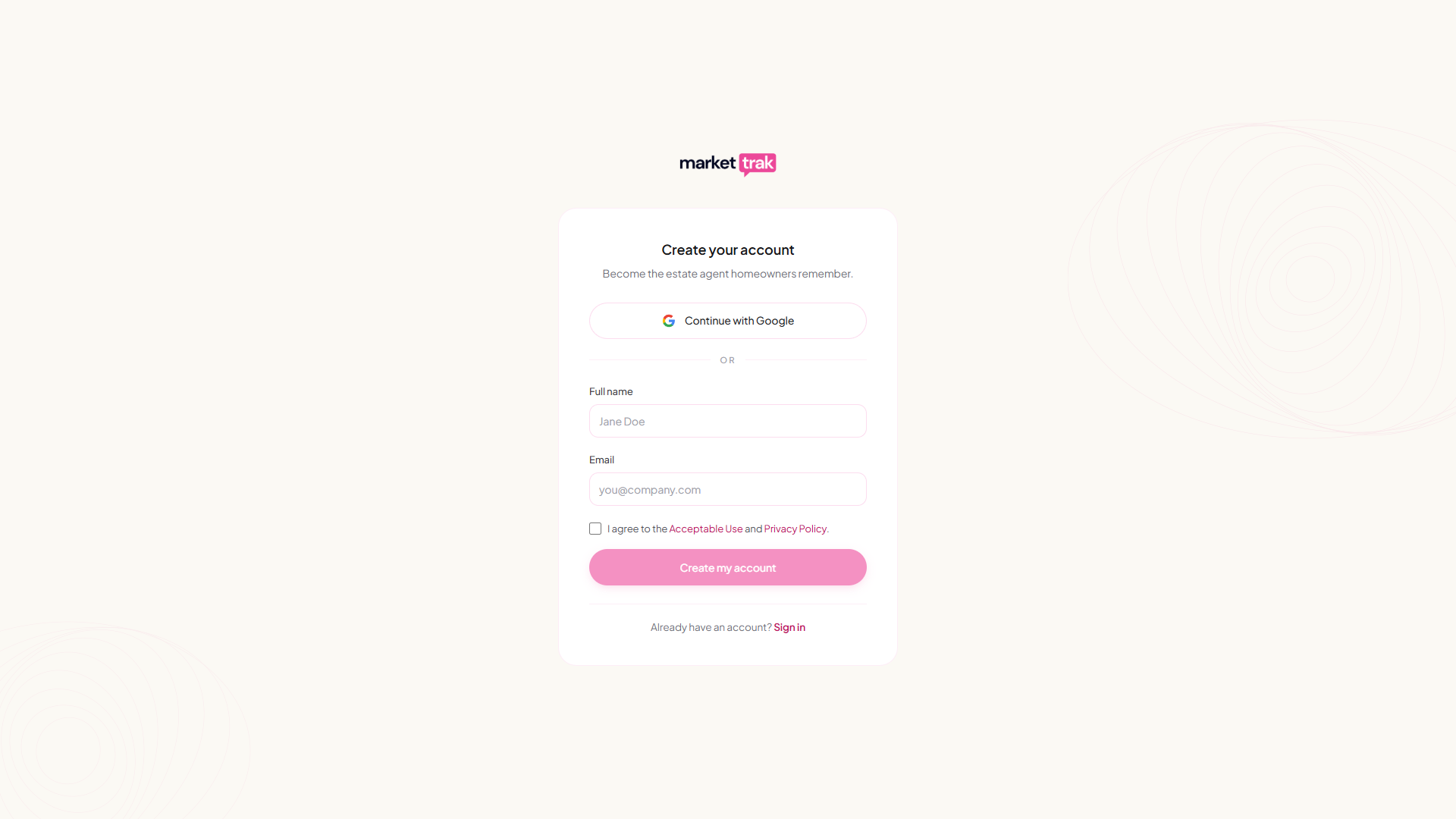
You can sign up with Google for the fastest start, or use email and password. Either route lands you on the same workspace setup screen.
Sign up with Google (fastest)
Go to marketrak.pro, click Get Started, then click Continue with Google at the top of the signup card. Choose your Google account and you'll skip straight to the workspace setup screen, no email confirmation step required. Your name and email come across from Google automatically.
The very first time you sign in with Google, you may see a "Google hasn't verified this app" screen. This is normal while Market Trak is being reviewed by Google and the warning will disappear once verification clears. You can safely continue past it.
Sign up with email and password
Enter your email
Go to marketrak.pro and click Get Started. Enter your name and email address. No card needed.
Enter the code we email you
We email you a six-digit code straight away; the code is right in the subject line, so you can often read it from the notification without opening the email. Type it into the box on the signup screen and you're verified and signed in. No need to leave the page.
The email comes from hello@app.marketrak.pro. If you can't see it, look in your spam folder, and in your Promotions tab if you use Gmail. Drag it into your inbox: every email we send you afterwards comes from that same address, so it will land in the right place from then on. Didn't get it? The Resend code button on the signup screen sends a fresh one.
Set your password
You land on a page where you choose a password for your account.
Tell us about your business
Enter your agency website. We scrape it for your branding (logo, colours, business name) so your Content Pack is on brand from the very first post.
See your first Content Pack
Within a few minutes, six social media posts and a market intelligence report for your area are delivered to your workspace, fully branded. This is your free preview of what Market Trak generates.
Your free Content Pack
Every new account includes one free Content Pack. You can view the posts, read the report, and see exactly the quality of content Market Trak produces for your local area, all without entering a card.
You can publish your pack's posts to your Facebook Page during onboarding for free; a small #MarketTrak hashtag is added to anything you publish on a free account or a trial, and is put back if it is removed before posting. On a paid plan the hashtag only appears on Content Pack posts, where it credits the market data behind them, and you are free to take it off. Posts about a property never carry it on a paid plan. To edit captions and images, schedule posts, generate more packs, or unlock the full platform (lead capture, email campaigns, additional reports, the AI assistant, and more), you need to subscribe.
When you tap any locked action, Market Trak shows you what a subscription unlocks. You can return to your pack at any time with the X button in the top-right corner.
To see the prices, you do not have to go looking for a locked button. While you are on a free trial, open the settings menu at the bottom-left and choose Pricing to see every plan side by side, with monthly and yearly options. At any other time the same plans are on your Workspace settings > Billing & Subscription page, and they are always on marketrak.pro/pricing, which works whether you are signed in or not. You can also just ask the AI Assistant what it costs.
The free Content Pack is a one-time preview per workspace, so make sure the postcode you enter on the website-scrape step is the one you most want to see content for.
Signing in
Already have an account? Go to marketrak.pro/auth and either click Continue with Google (if you signed up with Google) or sign in with your email and password.
If you originally signed up with email and password but would prefer to use Google going forward, click Continue with Google with the same Google account that owns your signup email. Market Trak will automatically link the two so you keep the same workspace and history, with no duplicate account.
Forgot your password?
On the sign-in page, click Forgot your password? and enter your email address. We email you a six-digit code, the same way signing up works. Type the code into the reset screen and you can choose a new password straight away. The code lasts an hour and works once; if it expires, the Resend code button on the same screen sends a fresh one. If you signed up with Google you don't have a Market Trak password. Use the Continue with Google button instead.
Next steps
Once you have explored your Content Pack and subscribed, follow the First Steps guide to finish setting up your workspace.