

Property Feed
Automatically generate social media posts from new property listings on your website or CRM.
The Property Feed is one of Market Trak's most powerful features. It monitors your agency website for new property listings and automatically creates social media posts for each one, saving you hours of manual content creation.
How it works
-
Your existing book is read in first - When you connect a feed, Market Trak catalogues the listings already on your website and reads each one's address, photo, price and details. Your properties start appearing in the property picker within minutes, ready for Property Packs, ads and posts, and the picker shows a live "Building your feed now" count while it works
-
Detection - Market Trak then checks your website (or CRM, if connected) every hour for new listings
-
Generation - For each new property found, three AI-generated social media posts are created automatically (caption and image), spread across five days so one listing does not take over your feed
-
Suggested times - Each post arrives with a suggested date and time at a good posting moment, such as 10am on a weekday or 11am at the weekend. Times are picked around the posts already waiting in your queue, so two properties found on the same day are never suggested for the same moment. If a day is full, the post moves to the next day with room
-
Review - Posts land in your Approval Queue for review
-
Publishing - Approved posts are published to Facebook and Instagram (or you can schedule them)
Each auto-generated post costs 5 credits. Reading in your existing book is free, and no posts are generated for it: those listings simply become available to pick.
Setting up the Property Feed
Prerequisites
-
Your agency website URL (the feed scanner will detect your listings automatically)
-
Facebook and Instagram connected for direct publishing (optional, see Facebook & Instagram Integration)
Adding a website feed
-
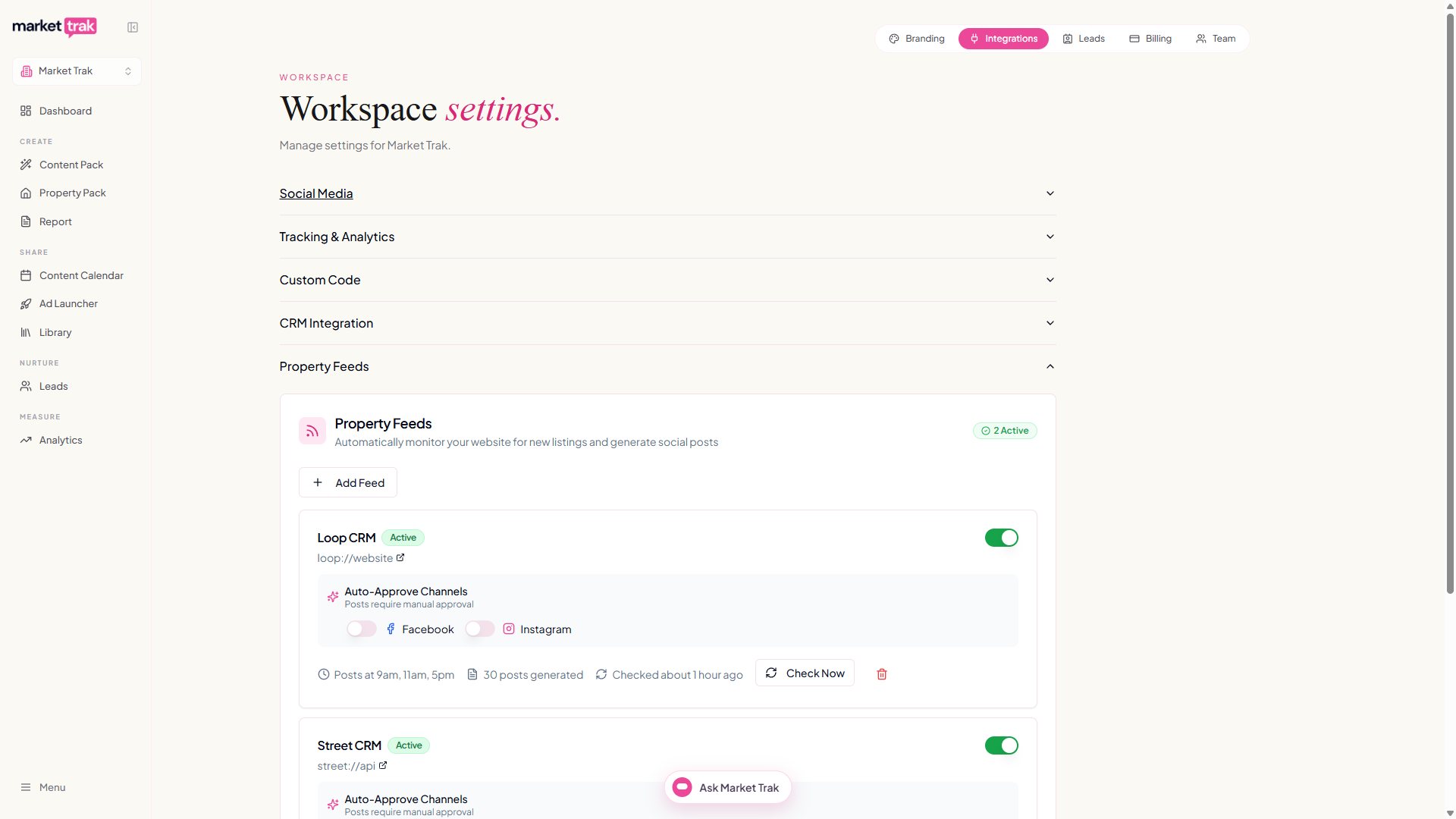
Go to Integrations and find the Property Feeds section
-
Click Add Feed
-
Enter your property search page URL, the page that lists all your properties (e.g.
https://youragency.co.uk/property-for-sale). Just your website address works too; the search page simply gives the scanner the best starting point -
Market Trak will scan your site and auto-detect your property listings. You'll see each step live as it works, including a running count as it reads your listing pages; larger sites can take a minute or two to scan fully
-
If detection succeeds, you will see how many properties were found
-
Click Add Feed to start monitoring
Market Trak supports three detection methods, tried in this order:
-
Listings feed - if your website is built on a platform such as Homeflow or Street, Market Trak reads your full property catalogue directly from the platform, with exact addresses, prices and photos and no page scanning at all. This is detected automatically and shown as "Listings Feed" when you add your site
-
Search page - if you enter a specific search URL (e.g.
youragency.co.uk/property-search/oryouragency.co.uk/properties/for-sale/), it parses the listing links directly. Given just a website address, the scanner looks for your search page automatically; this is the preferred method because your search page always shows your current stock -
Sitemap - falls back to your website's
sitemap.xmlif no listings page can be found (some websites' sitemaps update infrequently, which is why the search page is preferred)
For the most complete feed, enter your property search page URL (the page that lists all your properties), not just your homepage. Your homepage usually shows only a handful of featured listings, while the search page covers your whole catalogue.
Market Trak can also read listings on sites that load their results with JavaScript or that block automated visitors, so most modern agency websites work even when a basic scan would come up empty.
When the scanner finds listing links, it double-checks a sample of them to make sure they are real property pages rather than search or category pages before saving your feed. On websites with many similar-looking links (for example, a separate page for every "2-bed houses in..." combination) it narrows the feed down to just your listing pages automatically.
If automatic detection does not find your listings, you can provide a search page URL or an example property URL to help the scanner identify the correct pattern; if the scanner could not confidently identify your listings, pasting an example property link is the quickest fix. If a site is locked down so tightly that even this fails, you will see a message that the website is blocking automated access; contact support and we will help get your feed connected.
How many feeds you can add
Your workspace includes one website feed. That covers most agencies, because your search page usually lists your whole catalogue in one place.
Once you have added it, the Add Feed button turns grey and the counter beside it reads 1/1 website.
Configuration
The Property Feed is configured per workspace. You can set:
-
Listing filter - choose whether to monitor Sales listings, Lettings listings, or Both
-
Auto-approve per channel - toggle whether posts for Facebook and/or Instagram skip the approval queue and publish automatically
CRM feeds (beta)
If you have a CRM connected (Loop or Street), you can also enable a CRM feed. This monitors your CRM for new listings instead of scraping your website. CRM feeds are currently in beta and available to workspaces with an active CRM integration. You can enable the CRM feed toggle from the CRM integration section in your settings.
What gets generated
For each new listing, Market Trak creates:
-
A caption highlighting key property details (bedrooms, price, location, features), written as your agency and using the whole listing description rather than the first few lines. It always states your exact asking price, including any wording like "Offers Over", and closes by speaking to the sort of buyer the home would genuinely suit rather than inviting anyone browsing
-
A photo of the property, taken from the listing itself. Where the listing has several photos, each post gets a different one, so a property's posts don't all show the same front shot. Floor plans, EPC charts and agency logos are left out
-
Platform targeting for Facebook and Instagram
The content is based on the property data available from your website listing or CRM.
Managing feed posts
All feed-generated posts appear in the Approval Queue. From there you can:
-
Approve - publish or schedule the post as-is
-
Edit - modify the caption or regenerate the image before approving
-
Reject - discard posts you do not want to publish
Feed timing
-
The feed dispatcher runs every hour
-
New listings are detected based on their listed date
-
Your existing book is read in within minutes of connecting; if anything is left over, it fills in on the hourly checks
-
A stale feed cleanup job removes old, unprocessed items periodically
If your feed stops finding listings
If your website is redesigned or its listing pages move, the feed can stop finding properties. When that happens the feed's card in Integrations now shows an error message instead of silently doing nothing. Removing and re-adding the feed re-runs detection against your current website and usually fixes it; contact support if it does not.
Tips
-
Review your approval queue regularly so posts go out while listings are fresh
-
Use auto-approve if you trust the AI output and want zero-touch posting
-
Make sure your agency website is accessible and has property listing pages for the best detection results
-
If you also have a CRM connected, you can run both a website feed and a CRM feed simultaneously for maximum coverage