

Property Packs
Pick one of your properties and get six branded social posts, your logo and price composited into every image, ready to approve with a thumbs up.
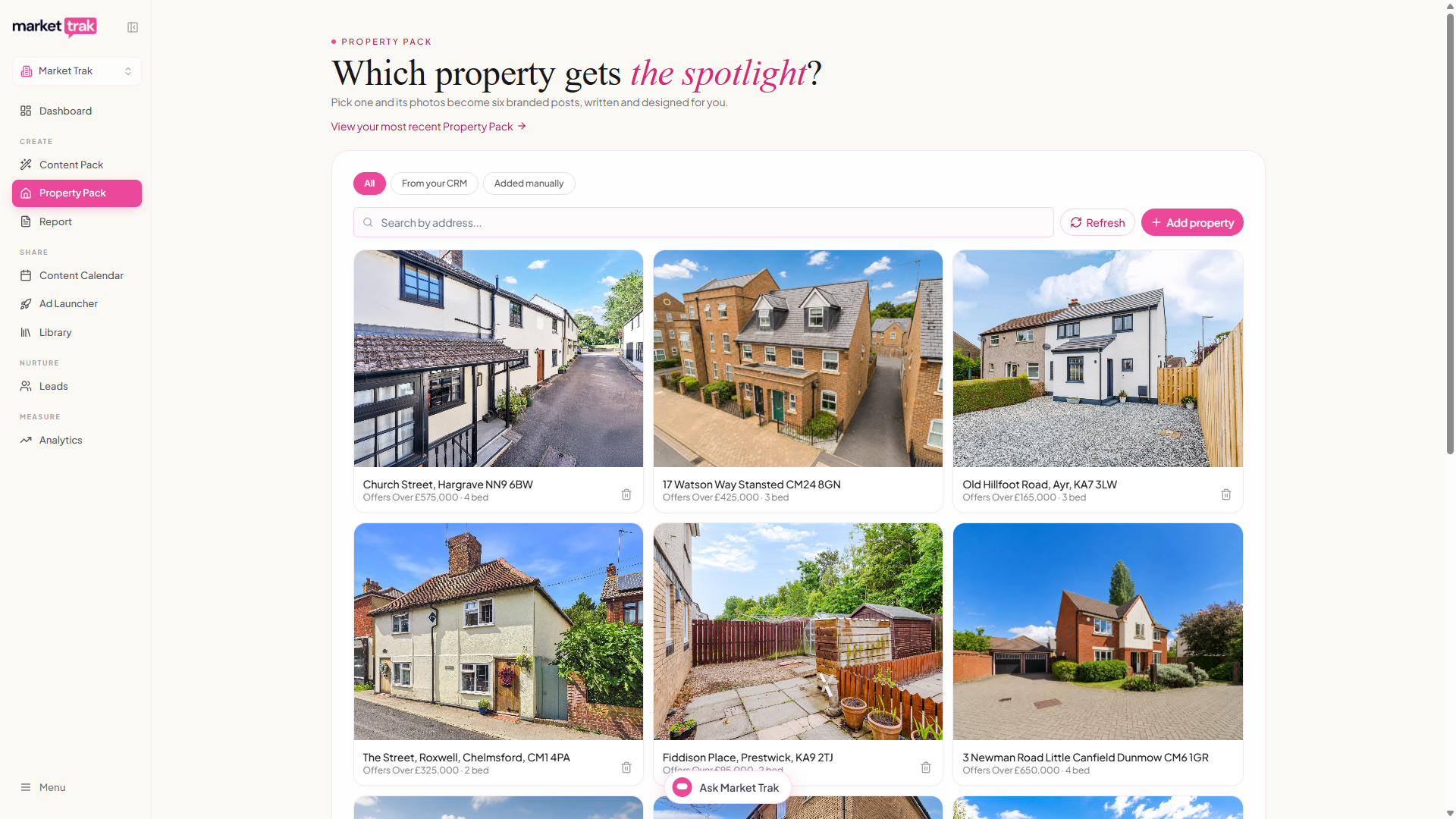
The Property Pack page turns one property into a week and a half of social content. Pick a property, check its photos and description, choose the occasion (Just listed, Open house, Sold and more), and about a minute later you have six designed posts. Each one uses a different photo with your agency's logo, brand colour and the property's price genuinely built into the image itself, not laid over it in the app, so the branding is part of the picture wherever it gets shared.
Find it in the sidebar under Property Pack, just below Content Pack. Every pack you generate is also kept in your Library (the Property Packs tab), so you can come back for another post about a property weeks later, and delete the pack once the property is gone; posts you've already scheduled or published stay where they are.
Property Packs are the Content Pack's sibling. A Content Pack markets an area from live market data; a Property Pack markets one property from its own photos and your listing description.
What's in a pack
Six post drafts, whatever you give it: add one photo and your best shots return in different designs; add six and every post gets its own. Every post in a pack has its own design, and each pack draws a different few: the street name in huge letters, an architect's drawing sheet, a film strip, the home's own colour palette, the facts set beside a tall photo, a magnifier on a detail worth seeing, and more.
Our older looks are still there if you like them: a price card on your lead photo, question and statement cards, quotes over the photo, a gallery-print look, a photo collage, and a plain post with the occasion ribbon or badge. They start switched off; switch any of them on in the Lookbook, where you choose every design your packs use. Designs show the price the way your listing gives it: a guide price is labelled Guide price, and a plain asking price is labelled Price.
Every caption is written from your own listing description, and each one is matched to its photo: the line about the log burner sits on the photo showing the log burner, not the garden. Captions end with a call to action (message the agency, comment for details, share it, save it, or view the listing), varied across the set.
Posts arrive with suggested publish dates one a day, so a property's six posts go out over about a week, while it's still fresh on the market.
How to generate a pack
Pick your property
The page opens on your property grid, the same catalogue the Ad Launcher uses. Everything is in one grid, newest first: your portfolio synced from your connected CRM (Loop or Street) or your website's property feed (sold CRM listings drop off automatically), plus anything you've added by hand. Click Add property to paste a listing's web address and Market Trak reads the details for you. A small filter above the grid narrows it to one source if you want.
No listing anywhere yet? Coming-soon stock works too: use Start with your own photos under the grid and upload them yourself.
Choose the photos
The property's full photo set appears with the best six already selected. Scroll through the strip (use the arrows or swipe), tap any photo to swap it in or out, and add your own with Add photos, by clicking it or by dragging files onto it. Six photos is the maximum; floor plans and EPC charts are filtered out for you.
Check the details
The description, price and address arrive filled in from the property you picked, ready to correct rather than type. Pick the Occasion (it drives the price card's tag and the ribbon and badge designs), and check the Listing link: when the property has a public listing page the link is filled in for you, and you can paste one or leave it empty.
Generate
The button reads Loading property photos... and stays unavailable until the full listing gallery has arrived, so you cannot accidentally generate from the front photo alone. Then click Generate my Property Pack. The progress screen tracks the real stages (writing your captions, branding your photos, wrapping up) and a pack usually lands in under a minute. Feel free to move around the app; if you come back mid-build you'll rejoin the progress screen, and if it finished while you were away you'll land straight on the results.
Reviewing your pack
The review works like a Content Pack week:
- Date chips: every post carries its suggested publish date, one a day at a good posting time, picked around whatever is already on your calendar so nothing clashes. Tap the chip to change the day or time; a date that has already passed turns red and needs a new date before approving. Times you set yourself are never changed.
- Thumbs up: schedules that post to its date on your connected channels, with Publish now instead and Change date underneath once approved.
- Thumbs down: removes the post from the pack. Unlike Content Packs there's no rebuild for the slot, because the pack is built from the property's fixed photo set; the rest of the pack stays as it is.
- Approve the week: one button schedules every post you haven't actioned, each to its own date, after confirming which channels to post to. If some of the planned dates have already passed, the dialog tells you and the button becomes Update dates and approve: your posts get fresh dates, one a day starting tomorrow. If your Facebook Page isn't connected yet, this button reads Connect Facebook instead, with a strip above the posts explaining why: connect once and it brings you straight back to the same pack, ready to approve.
- Edit first if you like: the pencil edits the caption and hashtags, and hovering the image lets you replace it or open the AI image editor.
A Property Pack and all its posts stay in your Library until you delete the pack, so posts you haven't used yet are still there when you come back for another one. Approved and published posts are yours forever, even after you delete the pack.
Where the links in captions go
- With a listing link on the pack, the first and last captions invite readers to view the full listing at that link.
- Without one (coming-soon stock, or a CRM property with no public page), the final caption points readers to your instant valuation page instead, so the pack still captures leads.
Cost and availability
Property Packs are available on paid plans. A pack uses credits from your balance, charged once per pack and only when your posts are delivered; a failed generation costs nothing.
Troubleshooting
Your workspace instructions
The saved workspace content instructions guide newly generated captions and image text, including scheduled content. Set them under Assistant memory > Workspace instructions. For example, you can ask for postcode districts instead of town names. Property facts, report data and working links remain accurate. Existing packs keep their original content until you edit or regenerate it.
Learn about workspace instructions.
How edits improve future posts
Meaningful caption corrections feed the same workspace learning system as Swipes. Paragraph breaks are preserved, and repeated edits of the same post do not count as independent examples. Correcting a price or property fact does not create a general style rule. Image replacements are recorded without guessing what you disliked from the image alone.
Review, correct, pause or remove learned preferences in Assistant memory. The list has at most 12 active preferences.