

Memory and Custom Instructions
Personalise the AI Assistant with custom instructions and let it learn from your conversations.
The AI Assistant gets smarter the more you use it. It has two systems that make it feel like working with a colleague who knows your preferences: auto-learning memory and custom instructions.
Auto-learning memory
As you chat with the assistant, it automatically picks up on important details and preferences from your conversations. For example:
-
The areas you frequently create content about
-
The tone you like your content written in
-
Your favourite image styles and aspect ratios
-
Common property types you deal with
-
Client communication preferences
The assistant learns from patterns in your usage over time. For example, if you consistently choose "Abstract Growth" style images, it will start defaulting to that style. Preferences are confirmed after being observed at least three times, so a single choice does not lock anything in.
How it works
-
Memories are extracted from your conversations automatically after you finish chatting
-
They are classified by topic (e.g. "market knowledge", "style preference", "area focus")
-
Usage patterns (image style, aspect ratio) are tracked as tallies that build over time
-
Once the assistant has learned your usual aspect ratio, it flags it as "your usual" in the aspect ratio list when it asks. It always asks rather than choosing for you, so the choice stays yours
-
When you start a new conversation, relevant memories are retrieved to provide context
-
You do not need to repeat yourself, the assistant remembers
Viewing your learned preferences
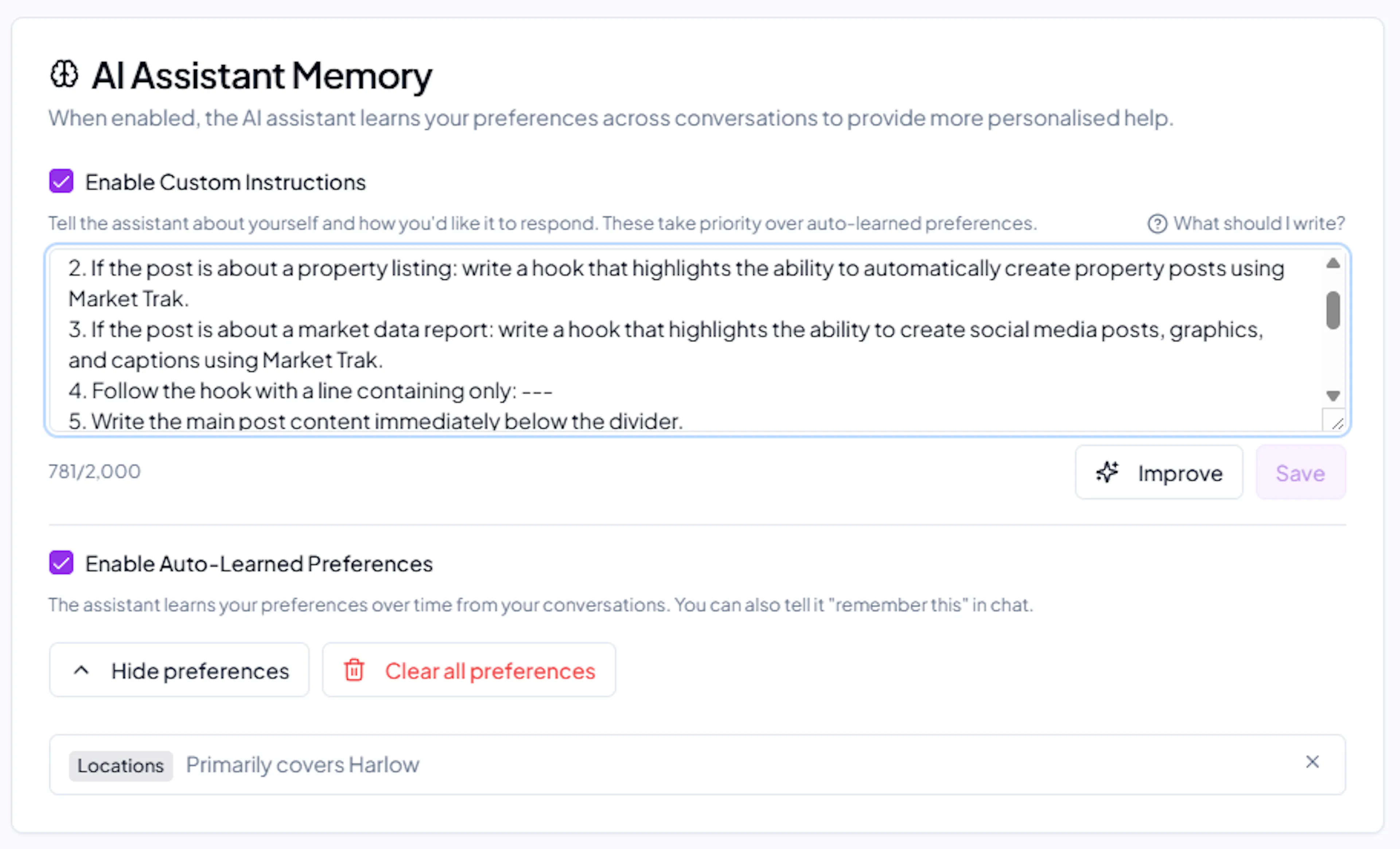
Open Assistant memory to see what the assistant has learned about you. On a computer, click your profile icon in the sidebar and choose Assistant memory. On a phone, tap your initials in the top-right corner and find it under Account. What you will see includes:
-
Your preferred image style (e.g. "Prefers Abstract Growth style images")
-
Your preferred aspect ratio (e.g. "Usually uses 4:5 aspect ratio")
-
Location preferences and other details picked up from conversations
You can delete any learned preference from this screen if it is wrong or outdated.
Telling the assistant to remember something
You can explicitly tell the assistant to remember a preference by saying things like "remember that I always want...", "from now on...", or "I prefer...". The assistant will confirm it has saved the preference immediately.
Privacy
-
Memories are scoped to your individual profile, not shared across team members
-
They are stored securely in your workspace database
-
Memory content is never used to train external AI models
Custom instructions
Custom instructions let you tell the assistant how you want it to behave. Think of it as a permanent briefing that applies to every conversation.
Setting custom instructions
-
Open Assistant memory (click your profile icon in the sidebar, or tap your initials on a phone and look under Account)
-
Turn on Your instructions
-
Write what you want the assistant to always know about you. If you are not sure where to start, tap What should I write? for some examples
-
Save
Improve rewrites what you have written into clearer, more direct instructions. It is worth a try if the assistant is not quite following you.
What to include
Good custom instructions might cover:
-
Your role and agency: "I am a senior negotiator at Smith & Co in Didsbury, Manchester"
-
Tone preferences: "Write in a friendly, professional tone. Avoid jargon"
-
Content style: "Keep social media captions under 150 words. Always include a call to action"
-
Local knowledge: "Our main areas are Didsbury, Chorlton, and Sale"
-
Formatting: "Use bullet points for property features. Always mention the asking price"
Tips
-
Be specific, vague instructions like "be helpful" do not change behaviour meaningfully
-
Focus on preferences that apply to most conversations
-
You can update your instructions at any time
-
Custom instructions and auto-learned memories work together, instructions set the rules, memories provide the context
Toggling memory
Learned preferences on the Assistant memory page turns the auto-learning on and off. When it is off:
-
The assistant will not extract or store new memories
-
Existing memories are preserved but not used
-
The assistant still works, just without personalisation context