

Managing Leads
View, filter, and take action on leads captured from your reports and valuations.
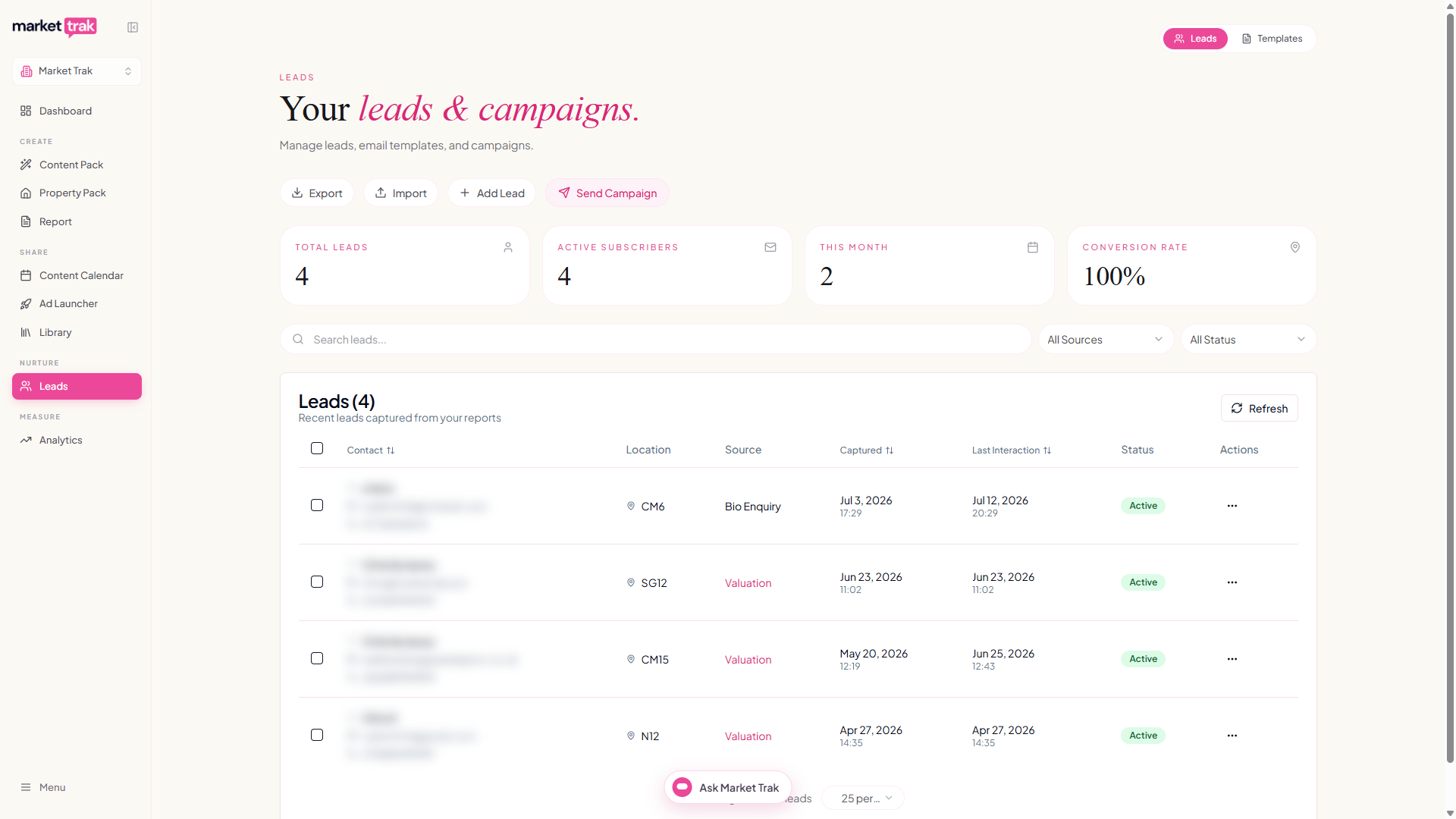
The Leads page is your central hub for everyone who has shown interest in your property marketing. Leads are captured automatically from public reports, valuation forms, and manual imports, then managed from a single dashboard.
Accessing leads
Click Leads in the sidebar (or navigate to /leads).
Note: Lead management is available on plans that include this feature. If you see a lock icon, you may need to upgrade.
How leads are captured
Leads flow into your workspace from several sources:
-
Report lead gate - when someone enters their details to view a public report
-
Valuation form - when someone submits an instant valuation request
-
CSV import - bulk upload from a spreadsheet (see Importing Leads)
-
Manual entry - add leads directly from the dashboard
-
Webhook - from external lead sources via your inbound webhook
Where each lead came from
Open any lead to see the marketing channel that brought them in (for example "Facebook ad", "Google ad", or "Organic search"), along with the campaign and landing page where known. See Where Your Leads Come From for the full list of labels and how to tag your links so they stay accurate.
Lead dashboard
The dashboard shows all your leads in a table with:
-
Name and email address
-
Location (the property or area they enquired about)
-
Source (report, valuation, import, etc.)
-
Date captured
-
Email status (whether they have been emailed, bounced, or unsubscribed)
Filtering and sorting
Use the filter bar to narrow your lead list:
-
Filter by source (report, valuation, import). The list always offers every source in your lead database, not just the ones on the page you are looking at
-
Filter by status (subscribed, unsubscribed, bounced)
-
Sort by contact name, date captured, or last interaction
-
Search by name, email, or location
Filtering and sorting apply to your whole lead database, so paging through the results never changes what is included.
Bulk actions
Select multiple leads using the checkboxes, then use Gmail-style bulk actions:
-
Send campaign - email all selected leads
-
Delete - remove selected leads
-
Export - download the selected leads as CSV, including any you selected on other pages
Exporting leads
The Export button at the top of the page downloads every lead matching your current filters, not just the page on screen. Set your filters first if you want a subset: filter to a single source, for example, and the file contains only those leads.
To export a specific handful instead, tick their checkboxes and use Export in the bulk actions bar. Your ticks are remembered as you page through, and "Select all" covers every lead matching your filters.
The file opens cleanly in Excel, Google Sheets and Numbers, and contains each lead's email, name, phone, location, source, capture date, last interaction, and status.
The lead record
Click a lead's name, or anywhere on their row, to open their full record. It slides in over your list and closes straight back to it, so you can review one lead, close it, and move on to the next without losing your place. On a phone it opens full-screen, and each record has its own link you can copy to share a specific lead with a colleague.
The record brings together:
-
Contact details - their name, email, phone, and latest enquiry location, each editable right on the page. Click a field, make your change, and a Save changes button appears. You can also unsubscribe or delete the lead from here.
-
Areas of interest - every postcode district (like CM1) the lead has enquired about, shown as small tags. A new area is added automatically whenever they enquire somewhere new, whether that's an ad enquiry, an instant valuation, or a report. You can add an area yourself (type a postcode or district) or remove one, then press Save changes. Campaigns use this list: when you send a campaign to selected areas, a lead is included if any of their areas matches.
-
Last contacted - next to the date the lead was captured, the record shows the date the most recent email went to them, or Not emailed yet if nothing ever has.
-
At-a-glance counts - how many instant valuations they have requested, reports they have opened, campaign emails you have sent them, emails they have opened, and notes you have added. Sent sits next to opened on purpose, so you can tell at a glance whether a quiet lead has been ignoring you or simply never been emailed.
-
Activity timeline - the full history for that lead, newest first: every instant valuation (click one to open its full details), every report they opened, every campaign email you sent them, every email they opened, every enquiry from a Facebook or Instagram ad or your bio link, and every note you have written.
Report opens only appear when the lead arrived through a tracked link, such as one of your email campaigns. A report opened from a link forwarded privately, for example over WhatsApp, cannot be matched back to the lead. Email opens are matched reliably.
Deleting a lead is permanent and also removes the instant valuations attached to them. Their report-open and email-open history is kept for your workspace analytics, but is no longer linked to a person.
Notes
When you speak to a lead, write down what was said. At the top of the activity timeline there is an Add a note box: click it, type what happened on the call, and press Save note.
Your note appears in the timeline alongside everything else, in date order. That is the point of putting it there: you can see that you emailed someone on the Tuesday, that they opened it on the Wednesday, and that when you rang on the Thursday they said they were waiting until spring. The whole story sits in one place, so you know where you stand before you pick up the phone again.
Notes are shared with everyone in your workspace and show who wrote them, so a colleague picking up the same lead can see what has already been said. You can edit or delete your own notes at any time using the links under each one. You cannot edit someone else's.
Once a lead has at least one note, a toggle appears above the timeline:
- All activity - notes mixed in with valuations, report opens and emails.
- Notes only - just what you and your colleagues have written.
The second is worth knowing about for a lead who has been on several campaigns, where there is a lot of automatic activity to scroll past.
On your main leads list, any lead with notes shows a small note count next to their details, so you can run down the list and see who has actually been spoken to. Leads with no notes show nothing at all.
Adding a note does not change the Last Interaction date on your leads list. That date tracks when the lead last did something, such as opening an email or requesting a valuation, so it stays a true measure of how warm they are.
Lead quality
Leads from the report lead gate, the email signup form, and the instant valuation tool are captured the moment a visitor submits the form. There is no longer a 6-digit verification code or a "click the link in your email to confirm" step. Junk submissions are filtered behind the scenes with:
-
Email typo detection that prompts "Did you mean gmail.com?" when a common domain is misspelled
-
Disposable email blocking that rejects throwaway services like Mailinator, Yopmail, Guerrilla Mail, 10minutemail, and around 121,000 other temporary inbox providers. People using a disposable address see a clear message asking them to use a permanent one, so the leads that do reach your dashboard are real
-
Invisible honeypot field that traps bots
-
Per-IP rate limiting to slow down brute-force junk submissions
The webhook to your CRM fires immediately on submit, so you can follow up before the lead's interest goes cold.
Unsubscribes
Every email sent through Market Trak includes an unsubscribe link. When a lead unsubscribes:
-
They are marked as unsubscribed in your lead list
-
They will not receive any future email campaigns
-
You can still see their details, but cannot email them
Bounced emails
Sometimes the email address attached to a lead stops working: the inbox is closed, the domain no longer exists, or the mail server permanently rejects messages from us. When that happens, the lead gets an amber Bounced badge on the dashboard and is automatically excluded from every future campaign send.
-
Filter by Bounced in the status dropdown to see who is affected
-
Hover the badge to read the exact reason your mail server gave
-
Send Campaign and AI-assistant sends skip these leads automatically, so you do not need to manually deselect them
Soft bounces (full mailboxes, brief outages) are not flagged. Only permanent failures are marked, so a lead with a Bounced badge is genuinely undeliverable rather than just temporarily unreachable.
Contact limits
Your plan includes a maximum number of contacts (leads). The current usage is visible in your profile menu. If you reach your contact limit, you will need to upgrade or remove old leads to add new ones.
Next steps
-
Email Campaigns to nurture your leads
-
Importing Leads to bulk upload from a spreadsheet
-
Welcome Emails for automatic onboarding