

Bio Link
A shareable "link in bio" page that gathers your online valuation and chosen reports in one branded place to capture seller and landlord leads.
Your Bio Link is a single, shareable page for the "link in bio" slot on Instagram, Facebook, TikTok, or your email signature. It gathers your lead-generating links in one branded place: your online valuation and up to four reports you choose. Every link leads to a page that captures the visitor as a lead, so it works as your social bio's front door.
Most of its links send visitors to a page that already captures leads (your online valuation or a report), sends them to your CRM, and triggers your welcome email exactly as they do today. The one exception is the Property of the Week card, which captures the enquiry itself before revealing the property (see below).
Setting it up
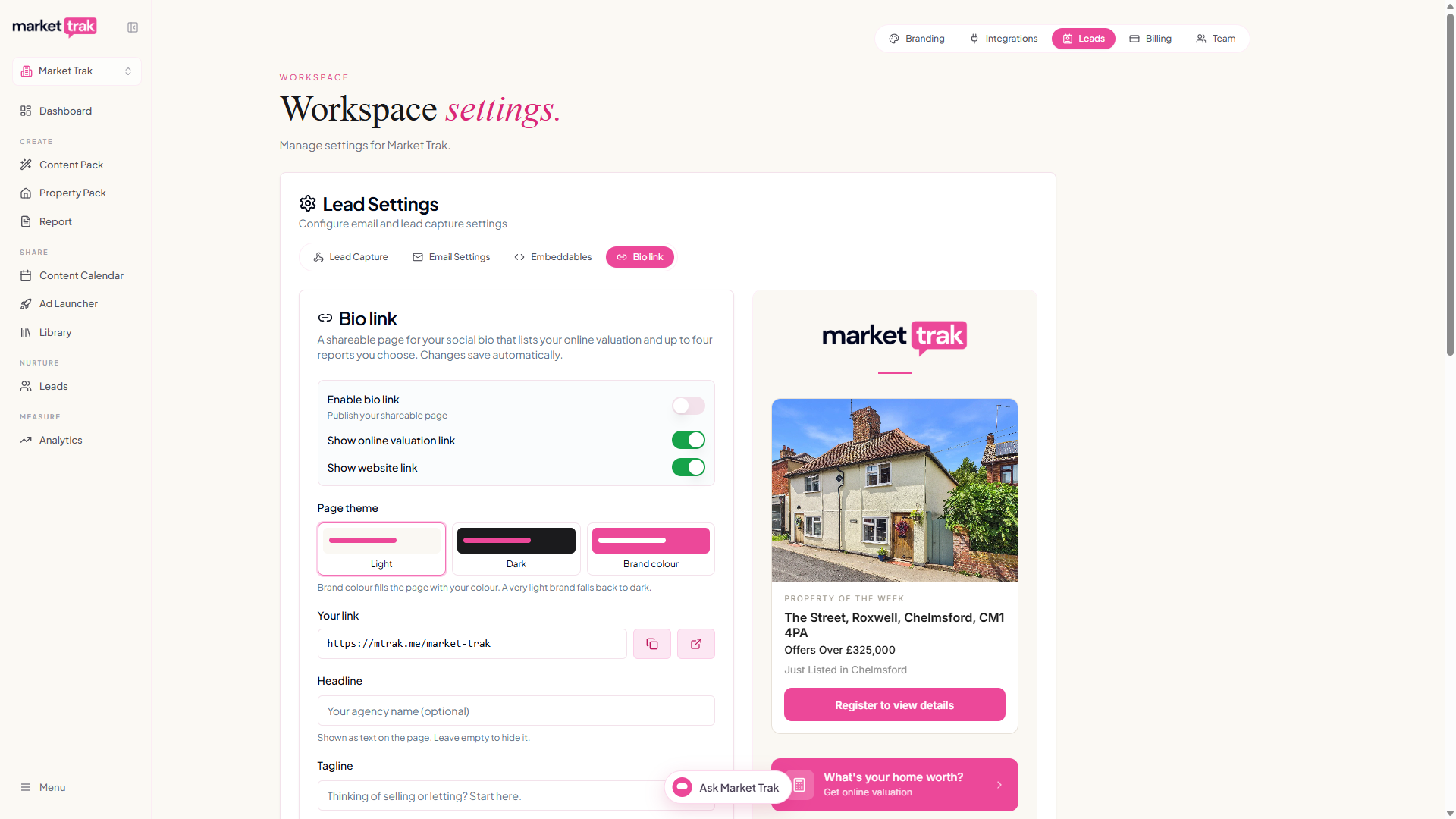
Go to Settings > Workspace Settings > Leads > Bio link. Everything you change here saves automatically (you'll see "All changes saved"); there's no save button.
-
Turn on Enable bio link to publish your page.
-
Use the live preview on the right to see exactly what visitors will see as you make changes. On a phone or a narrow window the preview sits below the settings, so there is a Preview button at the top that jumps straight to it.
-
Choose what appears with the toggles: Show online valuation link and Show website link (the website link uses the Business Website you set under Branding).
-
Add an optional Headline (your agency name) and Tagline. Leave the headline empty to hide it, your logo is shown above it.
Your link
Each workspace gets a unique, public bio link:
https://mtrak.me/your-workspace-slug
Copy it with the copy button next to Your link and paste it into your social profile's bio or website field. The page needs no login, so anyone can open it.
Older marketrak.pro/bio/... links continue to work, so you do not need to replace a link that is already published unless you want the shorter version.
If your slug changes, your old bio link keeps working too. Anyone who follows it lands on your page as normal and the address updates itself, so a link already printed on a card or sitting in your Instagram bio does not break.
Changing your link
The name after the slash is shared with your Instant Valuation link, so changing it here changes both.
Click the pencil
Next to Your link, click the pencil button. The name becomes editable.
Type the new name
Use lower-case letters, numbers and hyphens, at least three characters. Spaces and other characters are turned into hyphens as you type.
Save
Press Save (or Enter). If another agency already uses that name, you will be asked to pick a different one.
Anything you have already shared keeps working. The old address carries visitors to your page and updates itself to the new one.
The shorter address applies only to the Bio Link page itself. Its Instant Valuation and report buttons continue to open their existing Market Trak pages.
Adding reports
On the preview, use the + Add market report button to choose a report from the searchable list. You can feature up to four. Drag the report cards to reorder them, and remove one with the x on its card. Any report you add is published automatically so its link works for visitors.
Property of the week
You can feature one property at the top of your Bio Link. Unlike the other links, this card captures the enquiry itself: a visitor registers their details before they see the full property, so their interest lands in your Leads instead of leaving for a portal.
Turn on Show a featured property in the Property of the week card, then add the property one of two ways:
- Paste a listing link. Paste the property's URL and press Fetch. Market Trak pulls in the photo, price and details and writes a one-line description. Edit any of it, and replace or edit the photo with the same tools you use on your posts.
- Build it by hand. For a property that isn't listed anywhere yet, upload a photo and fill in the title, price and description yourself.
You can also add one qualifying question, the same set your Facebook ad forms use, such as "Do you have a property to sell?". It's optional, and a "yes" is your signal that a buyer enquiry is also a potential seller.
What the visitor sees
When someone taps the card, a form asks for their name, email and phone (all required) and your question. After they register:
- If your property has a listing link, they get a View full property details button.
- If it doesn't, the card shows as coming soon and they're told you'll send the full details before it goes live, which makes a strong pre-launch teaser.
Either way the enquiry is captured first, so nothing is lost. It appears in your Leads straight away with their answer to your question and an Enquired via bio link entry on the lead's activity timeline, and you get a "New property enquiry" email that highlights anyone who has a property to sell.
Call and WhatsApp buttons
You can add a Call button and a WhatsApp button to your Bio Link so visitors can reach you in one tap, on a phone or a computer.
First add your number under Settings > Workspace Settings > Branding > Contact details:
- Business phone powers the Call button. Type it however you like, such as
07911 123456; we format it for calling automatically. - WhatsApp number powers the WhatsApp button. Add it even if it is the same as your business phone: we never assume the two match, because plenty of office numbers are landlines with no WhatsApp behind them, and a button pointing at one takes your visitor to an error.
Then, under Leads > Bio link, switch on Show call button and Show WhatsApp button. Each button only appears once you've added a number and switched it on. The Call button opens the visitor's phone dialer with your number ready to dial; the WhatsApp button opens a WhatsApp chat with you.
A logo or a profile photo
By default your Bio Link shows your agency logo at the top. If you'd rather show a photo (a headshot works well for a solo agent), open the live preview in Leads > Bio link and use the camera button on the header to upload one. It appears as a round photo in place of your logo. To switch back, use the remove button on the photo and your logo returns.
Choosing a theme
Pick how your page looks with the Page theme picker:
- Light - a clean, warm off-white background with your dark logo.
- Dark - a deep charcoal background with your white logo.
- Brand colour - a soft wash of your own brand colour, so the whole page feels like yours.
In every theme your valuation button, report cards and website button use your brand colour. The picker shows a swatch of each look and updates the preview as you choose, so you can see exactly what visitors will get.
Branding
The page uses your agency logo (the light or dark version is picked automatically to suit your chosen theme) and your brand colour throughout. Set your logo and brand colour under Settings > Workspace Settings > Branding.
Seeing how it performs
Open Analytics to see your Bio link views for the period you pick, with leads it captured counted in the Every channel card. For the full detail, which buttons people tapped (your valuation, reports, website, Call, WhatsApp and your featured property) and how many opened the Property of the Week card against how many registered, open Analytics on your phone and tap Bio link under Go deeper. The counts are anonymous, so it's about volume and which links pull, not who tapped.
Tracking and analytics
If you've set up tracking pixels (Meta or Google) in your workspace settings, they load on your Bio Link page automatically, so you can measure visits and retarget people who tapped through from your social profile, the same as on your reports and valuation page. If your cookie consent banner is enabled, visitors see it here too and pixels only fire once they accept. There's nothing extra to switch on.