

Email Signup Embeds
Embed a branded email signup form on your website to capture subscribers directly into your Market Trak dashboard.
Email signup embeds let you add a branded subscription form to any page of your website. Anyone who signs up flows into your Leads dashboard, ready for welcome emails and campaigns.
Finding the embed library
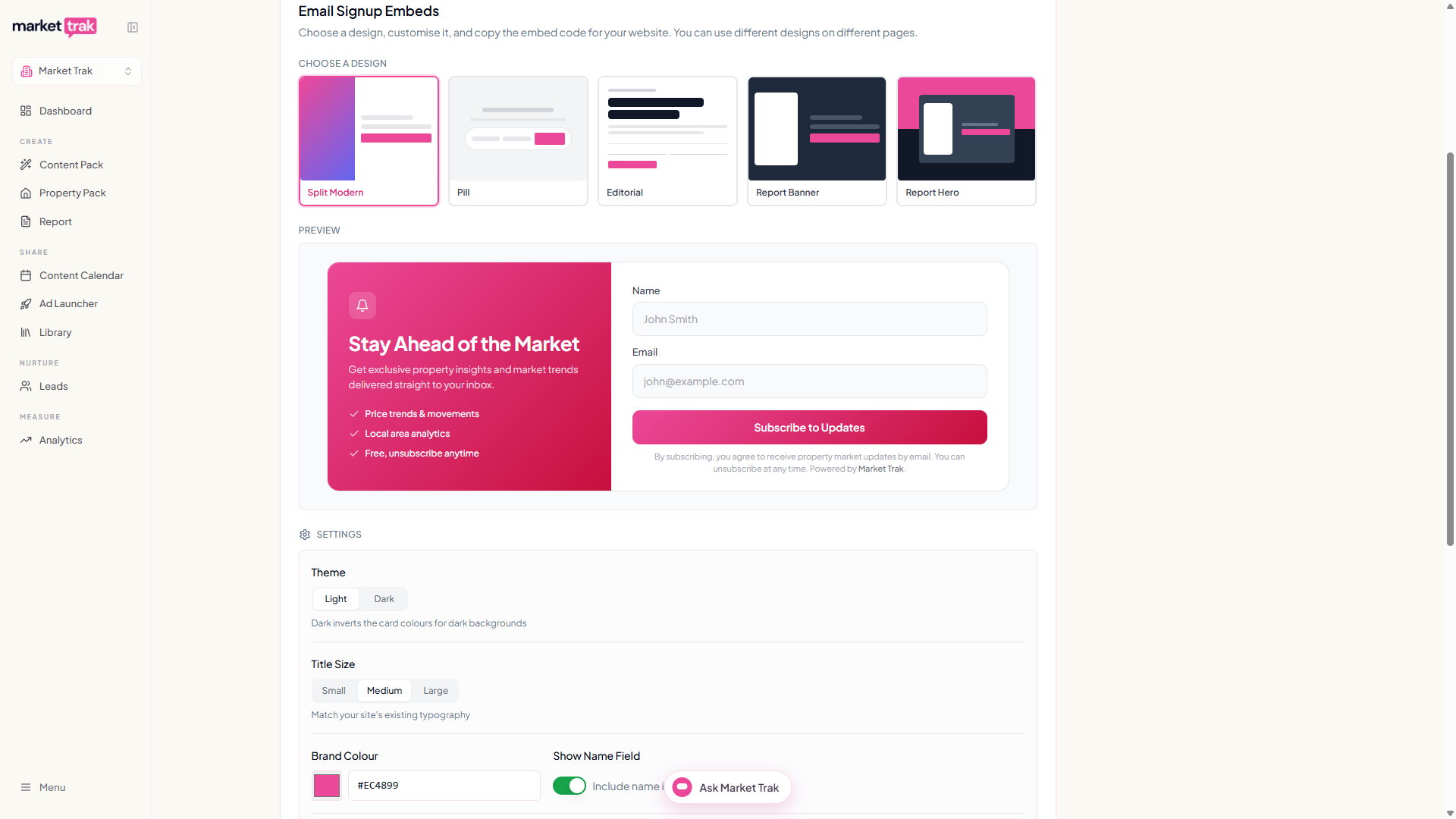
Go to Leads > Embeddables. You will see a gallery of five designs, a live preview, a settings panel, and the embed code to copy.
Choosing a design
There are five styles to pick from. You can use different designs on different pages of your site (a Pill in the footer, a Split Modern on a landing page, and so on).
Split Modern
Two-column layout. Gradient panel on the left with your headline and benefit bullets, clean form on the right. Great for landing pages and blog sidebars.
Pill
Compact inline pill. Starts with just the name field. The email input and Subscribe button slide in as visitors type. Minimal footprint.
Editorial
Magazine-style typography with a bold serif-feel headline and a bordered button. The headline auto-generates as "The [Your Area] Brief". Quietest and most premium.
Report Banner
Dark side-by-side layout. A mock property report sits next to the signup form with a brand-colour accent bar at the top.
Report Hero
The most dramatic option. A split background (your brand colour on top, dark on the bottom) with the report mockup overflowing into the brand-colour half. Big visual statement.
Customising the design
Every design has the same core settings plus a few that only apply to certain styles.
Settings that apply to every design
-
Theme - Light or Dark. Light is the default and works on most sites. Dark is designed for dark backgrounds: the Pill becomes transparent with a subtle border, and the other designs invert their card colours.
-
Brand Colour - Starts from your workspace brand colour. Every design uses this for the button, accents, and highlights.
-
Show Name Field - Toggle the name input on or off. Most agents leave this on for richer lead data.
-
Button Text - Defaults to "Subscribe to Updates". Edit to anything you like.
-
Title Size (Split Modern, Pill, Editorial, Report Hero) - Small, Medium, or Large. Choose what matches the typography of your website. Medium is the default.
Settings for specific designs
-
Show Title (Pill and Editorial) - Hide or show the headline and subtitle above the form.
-
Alignment (Pill) - Left, Center, or Right. Controls where the pill sits within wider containers. The title and subtitle text align to match.
-
Title and Subtitle (Split Modern and Pill) - Edit the headline and description text.
-
Location (Editorial, Report Banner, and Report Hero) - The area this embed is for, e.g.
Greenwich, SE10. The Editorial design uses it to build the headline ("The Greenwich, SE10 Brief"). The Report designs show it in the call-to-action. -
Description (Report Banner and Report Hero) - Editable intro paragraph alongside the form.
Embed Reference
The Embed Reference field is optional and lets you identify which embed a signup came from when you have multiple embeds on different pages. Set it to something like homepage-footer or blog-sidebar. The reference is included in webhook payloads so your CRM can route leads differently based on where they signed up.
Copying the embed code
Pick a design and customise it
Choose a style from the gallery, set the theme, brand colour, and any text you want to change. The preview updates instantly.
Copy the code
Click Copy above the code block. The code is a single <div> with an <iframe> and a small <script> that handles auto-resize.
Paste into your website
Drop the snippet anywhere in your site's HTML - a page builder's custom HTML block, a WordPress HTML widget, a Squarespace code block, etc. The form renders immediately.
Using multiple embeds
You can generate as many embed codes as you like. Each code is self-contained, so different designs and settings can live on different pages of your site. Common setups:
-
A Pill in the site footer for maximum reach, and a Split Modern on a high-intent landing page.
-
A Report Banner on area-specific landing pages (Greenwich, Blackheath, etc.), each with its own location setting.
-
An Editorial on your blog sidebar for a quieter, publication feel.
Your settings are saved to your browser automatically. If you close the page and come back, your last configuration is waiting for you.
What happens when someone signs up
A new lead appears in your Leads dashboard with the source embed_signup. If you have set an Embed Reference, that value comes through so you can filter or route by placement. All the usual welcome emails, webhooks, and campaign triggers fire as they would for any other lead.
Mobile responsiveness
Every design is designed mobile-first. On small screens:
-
Side-by-side layouts collapse to single columns.
-
The Pill stacks the name, email, and button vertically.
-
Report images resize to fit the form width.
No extra setup required.