

Swipes
Review small batches of ready posts, fill gaps in your calendar and teach Market Trak through your corrections.
Swipes gives you ready-to-use posts about your patch and listings. Keep a post to schedule it, Save it to your Library, or Pass. Meaningful corrections help improve future posts across Market Trak.
Find Swipes in the sidebar's Create group. On a phone, tap Content, then Swipes.
Posts about your own listings come from your website or CRM feed. Each one shows a photo of the property with your logo, in one of the Property Pack designs you have switched on in your Lookbook: the street name in huge letters, the postcode in a compass ring, the facts beside a tall photo and more, a different one on each card. If you have Quote switched on, some cards show a small For sale label and one line such as "3 bed semi in Congresbury", the style of the branded image in the Property Ad Launcher. Designs that carry a price show it on the picture.
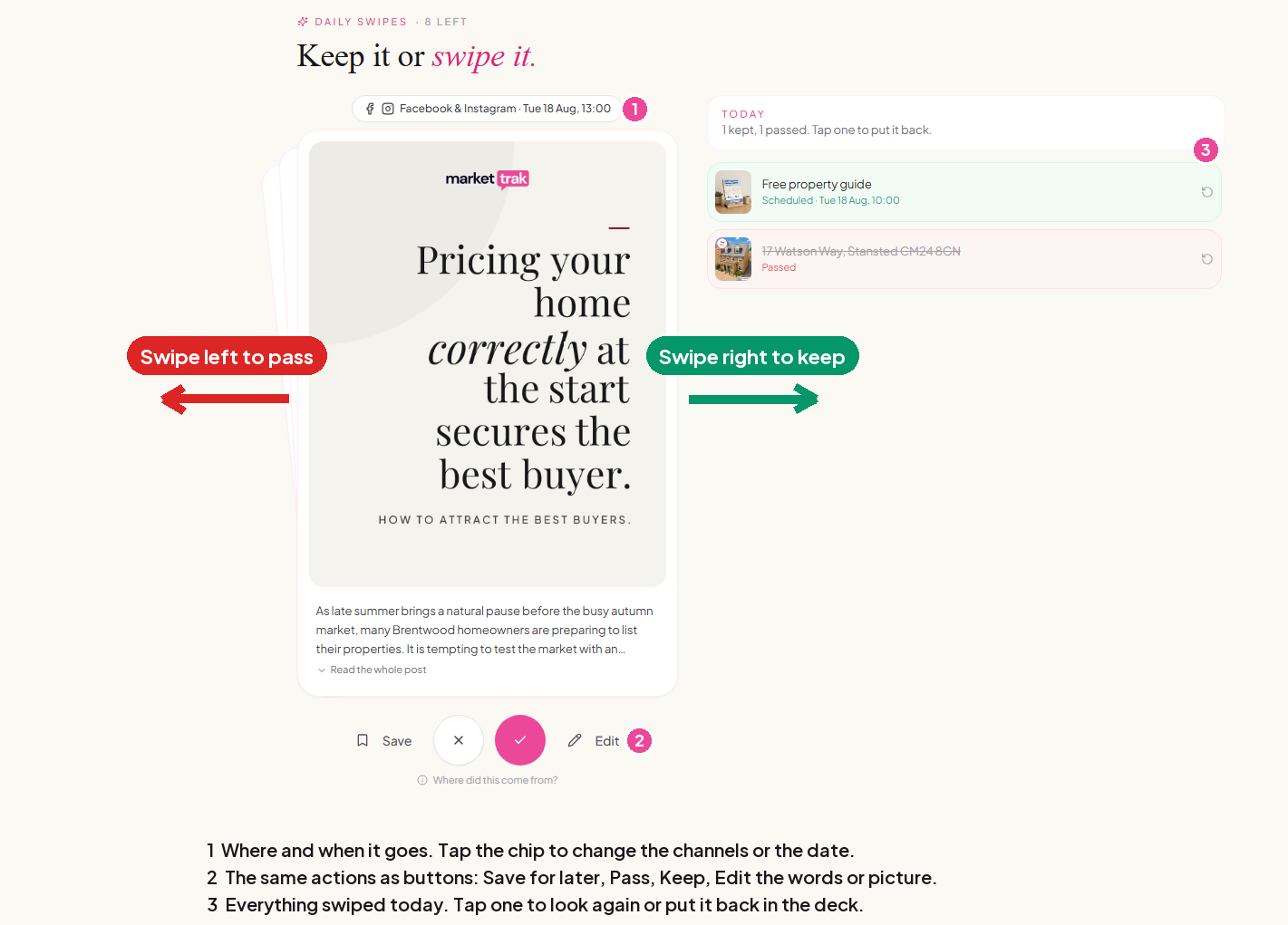
Your suggestions and where kept posts go
Swipes fills the gaps in your calendar for the next week, up to three posts a day, counting everything already planned, including your Content Packs and Property Packs. You get up to five new suggestions a day, and never more than there are gaps to fill. When every day of the next week already has three posts, Swipes tells you your week is full and when your next suggestions arrive. Suggestions and their images do not use your credits. Free accounts do not receive new decks; trials receive eligible plan access. Administrator-set allowances can differ.
When you keep a post, Swipes puts it on the next day that does not already have one of your Swipes posts and has fewer than three posts, starting tomorrow, so your kept posts go out one a day. Once every day of the coming week has one, it starts a second round from tomorrow. Kept posts normally go out within a week, so their figures stay current. The second week is only used when the first has no room at all.
Your packs come first: they can still use up to six posts a day, so Swipes never takes the room they need.
Batches are made on demand. Returning users can have a batch start when they open the app. Trial reminders may also prepare a batch, provided there are no waiting cards and your allowance permits it.
Keep, Save and Pass
- Keep puts the post on your calendar. Check the proposed date above the card first. Automatic dates go one a day from tomorrow, on days with fewer than three posts, weekends included, at least 90 minutes from any other post and never more than six posts on a day, counting your packs. If another post takes the slot before you keep it, the date is rechecked.
- Save puts the post in your Library without a date.
- Pass removes the suggestion from your deck.
On a phone, swipe right to Keep or left to Pass. The buttons work on every screen. Edit the words or replace the image before keeping or saving a post.
If you have no usable Facebook connection, Keep saves the post to the Library and tells you. If the next two weeks are completely full, Keep saves the post to the Library and tells you, or you can choose your own date. A time you choose yourself must be at least 30 minutes ahead.
Where did this come from? shows the source area and period for a market-data card. Advice cards without a figure are identified as opinions. Missing market figures are left out rather than presented as zero.
Changing your mind
Today's decisions appear beneath the deck. Put it back in the deck undoes the decision and withdraws its learning evidence. If the post is still pending on your calendar, it is removed from the calendar too, including a saved post you later scheduled from the Library. A saved Library copy is withdrawn to avoid duplicates when you keep it again.
Once publishing has started, the post cannot be put back. A card already resolved through the approval queue cannot be restored over that separate decision.
You do not have to finish a deck. Unreviewed suggestions can remain until you return, but suggestions older than two weeks and cards based on an earlier month's figures are retired. Retirement is not treated as a dislike. Posts you deliberately kept or saved remain your work.
How your corrections teach Market Trak
Edits in Swipes, Content Packs, Property Packs and the calendar feed the same learning system. Library and approval-queue edits contribute too. Paragraph breaks are preserved. Repeated corrections on different posts provide stronger evidence than repeatedly changing one post.
A corrected price, spelling or link does not become a general writing preference. Keeping posts about one property does not imply you want its features mentioned everywhere. Saving a post without editing it is not an endorsement of its style.
After every few passes, you can explain what was wrong. Not needed right now removes the decision from taste evidence. An explanation enriches the original pass rather than counting as another vote.
Control what it learns
Open Assistant memory > Content preferences to:
- See up to 12 active preferences, with supporting examples where available.
- Correct a preference. Your correction becomes confirmed and is not replaced automatically.
- Remove a preference, then restore it deliberately if you change your mind.
- Pause learning and application of inferred preferences. Confirmed corrections and explicit workspace instructions remain in force.
Older preferences are not removed simply because they are old. We merge similar ideas and favour stronger evidence. A removed category is not inferred again unless you restore it or provide an explicit instruction.
Related
Content Packs
A full week of posts and a market report for an area you choose.
Scheduling and publishing
What happens to a post once it is on your calendar.
Permanently delete a removed preference
Under Removed preferences, choose Delete permanently beside Restore, then confirm. The preference disappears from the list and cannot be restored. We retain a hidden block against learning it again; the deleted preference text and attached examples are removed. Your original post feedback remains separate.