

Your Patch Report
A monthly report on your patch: the market in numbers, where the sales are against your listings, who you are up against on Google, and where to focus.
Once a month, Market Trak builds you a patch report: one page that shows where you stand across your postcode areas, built from live data at the moment you ask for it.
Where to find it
Go to Analytics in the sidebar (under Measure) and open the Your patch tab. On your phone, open Analytics and tap Your patch report under Go deeper.
You will see one row for each month. The current month carries a Generate button until you build it; past months open instantly.
Building this month's report
Press Generate
The report builds from live data in a couple of minutes. You can watch each section land, and it keeps building if you navigate away.
Read it
It opens with what stands out this month, then the numbers behind it.
Download it if you want it on paper
Download PDF at the top saves the report as a PDF to print or share with a colleague.
A report is a snapshot of live data, so a month you never build is gone rather than waiting. Each new month unlocks on the 1st.
What the report shows
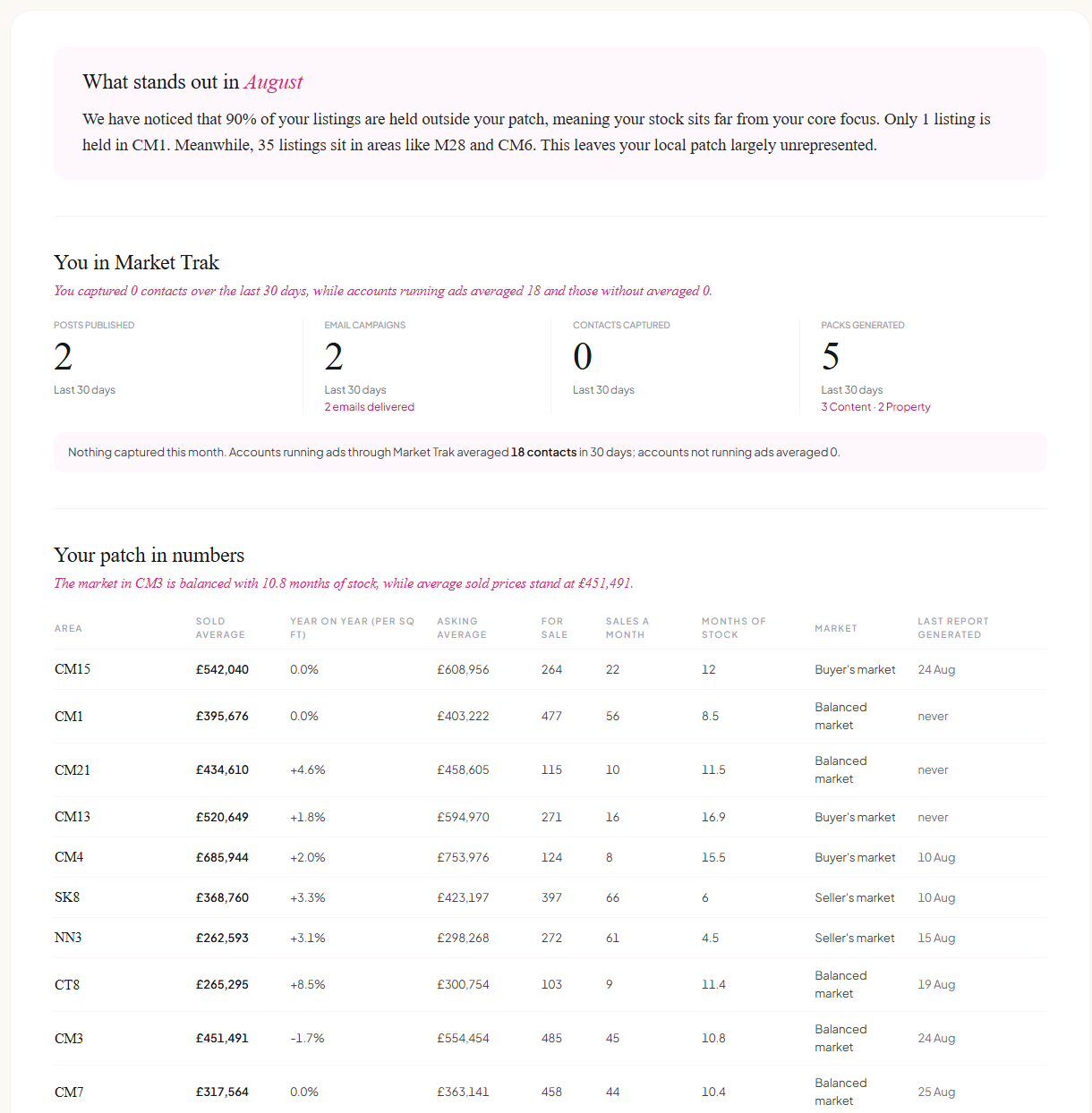
- What stands out - the single most striking thing in this month's data, with the figures behind it.
- You in Market Trak - the same four tiles every month: posts published, email campaigns sent, contacts captured and packs generated, all over the last 30 days. From your second report, each tile shows the change against your previous report.
- Your patch in numbers - for each of your postcode areas: sold and asking averages, the year-on-year change in price per square foot, homes for sale, sales a month, months of stock and the market type. Under the table sits the UK House Price Index change for the same period, so you can see whether your patch is ahead of or behind the country.
- Where the sales are, and where your listings are - sales registered with HM Land Registry over the last 12 months, broken down by postcode sector with the busiest streets, next to how many of your own live listings sit in each. A listing whose address names only the town appears in an "Elsewhere in" row, so the totals always add up.
- Who you are up against - the UK agents Google lists for each of your towns, with their rating and review count. Agents whose UK location cannot be confirmed are left out. Click any name to open their Google listing and read their reviews.
- Where to focus this month - four actions picked from your own numbers, each one opening the tool that does it.
"Sales registered" counts a sale when HM Land Registry records it, which is usually one to three months after completion. It is the official record, just a little behind the front door.
Who gets it
Every paid plan includes a monthly patch report. A free trial includes one report. Your past reports are always kept, and you can open any of them from the list.
The report covers your postcode areas, so it needs at least one: an area joins your patch the first time you run a market report for it.