Valuation and Market Report Ads
Advertise your instant valuation, or give away one of your market reports, to homeowners in one of your areas. Market Trak writes the ad, draws the picture and sets the targeting, ready to launch in a couple of taps.
Not every ad has to be about a property. The Ad Launcher has two more types of ad:
- Online valuations reaches local homeowners who are interested in the value of their property and sends them to your instant valuation page, so every valuation lands in your Leads.
- A market report gives away one of your own reports, so every person who asks for it lands in your Leads.
Both open ready to go: your area, an ad written for it, a choice of pictures in your brand colours, and a budget. Check it over and launch.
Before you start
You need the same things as for a property ad: Facebook connected with advertising allowed, a Business Manager ad account with a payment method, and two-factor authentication on your Facebook profile. See Before you start on the Property Ad Launcher page.
- Valuation ads need the instant valuation page, which is part of your plan.
- Market report ads that use a Facebook form need your privacy policy link in Workspace Settings, because Facebook asks for one on every form.
You pay Facebook directly for the ad spend from your own ad account. Publishing an ad uses a few of your Market Trak credits, the same launch fee as a property ad; you'll see the amount before you launch.
Choosing what to advertise
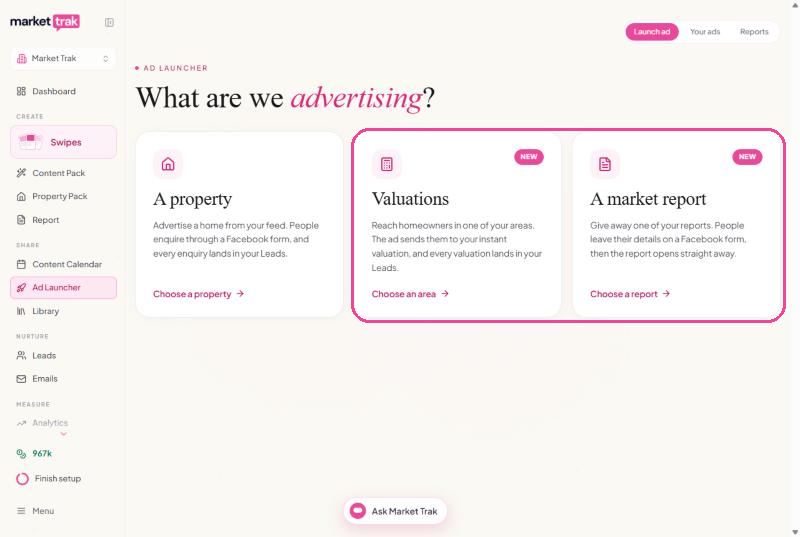
Open the Ad Launcher from your sidebar. The first screen asks What are we advertising? Choose Online valuations or A market report. Start again at the top of the page brings you back here at any time.
Valuation ads
Choose the area
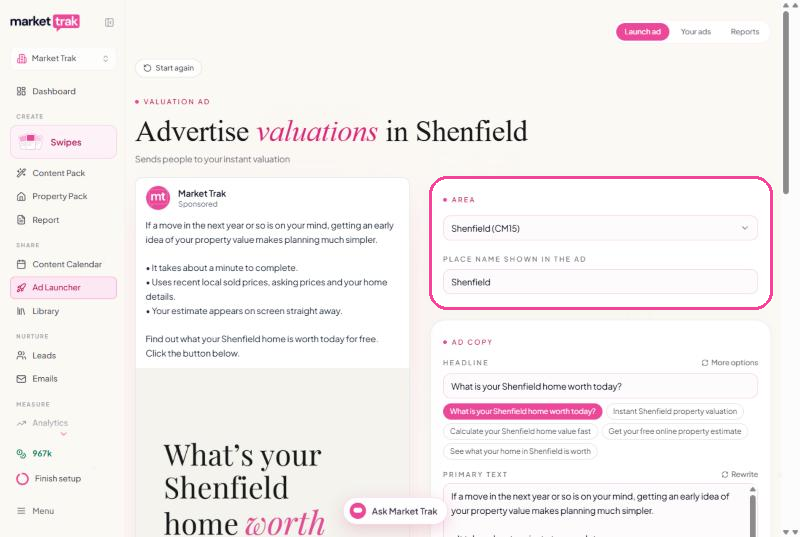
Pick one of your postcode areas from the Area list. Market Trak names it the way locals do, for example Shenfield for CM15 rather than the post town. If you'd call it something else, change Place name shown in the ad; it's the name on the picture and in the ad's text.
Check the ad copy
Market Trak writes the ad as soon as the area is chosen, and writes a new one whenever you change the area or the place name. More options gives you five headlines to pick from. Rewrite writes the ad in a different style each time you press it: bullets, a short story, questions, your area's average price first, a numbered list or a short version. You can edit anything by hand.
Pick the picture
Choose one of the pictures, drawn in your brand colours: a question ("What's your Shenfield home worth today?") or your area's average asking price, each with a button on it. They have no logo, because your Page name already shows who the ad is from; switch to With your logo if you'd like it on the picture.
Set your budget and launch
Choose a daily budget and how many days to run, from 3 days up to 30, then Launch ad and confirm. Facebook adjusts who sees an ad as the results come in, so a longer run gives it more to learn from. There's no open-ended option, so an ad never runs on your card without an end date; when one finishes, Extend in Your ads runs it again.
What Facebook looks for
If you've saved your Facebook pixel in Workspace Settings > Tracking, Facebook shows the ad to the people most likely to finish a valuation, using that pixel. Without one, it shows the ad to the people most likely to click. Either way, every valuation the ad brings in is counted against it in Your ads. The screen tells you which one your ad will use, with a link to add your pixel.
Market report ads
Choose the report
Pick one of your reports from the Report list, newest first. The ad uses that report's area, its place name and its figures, so the ad and the report always match: a report called "Pulborough, RH20" gives an ad for Pulborough, which you can still change under Place name shown in the ad.
No report for an area yet?
Areas without a report are at the bottom of the same list, under No report yet. Choose one and press Make it now: Market Trak makes the report for you at the normal report cost, then builds the ad from it.
Keep it up to date
If the report is from an earlier month, you'll see the same offer you get when you email a report: update it first, so the ad goes out with this month's figures. Update the report refreshes it in place, at the normal report cost, and its link stays the same.
Check the copy, the picture and the budget
These work exactly as they do for a valuation ad.
Where leads go
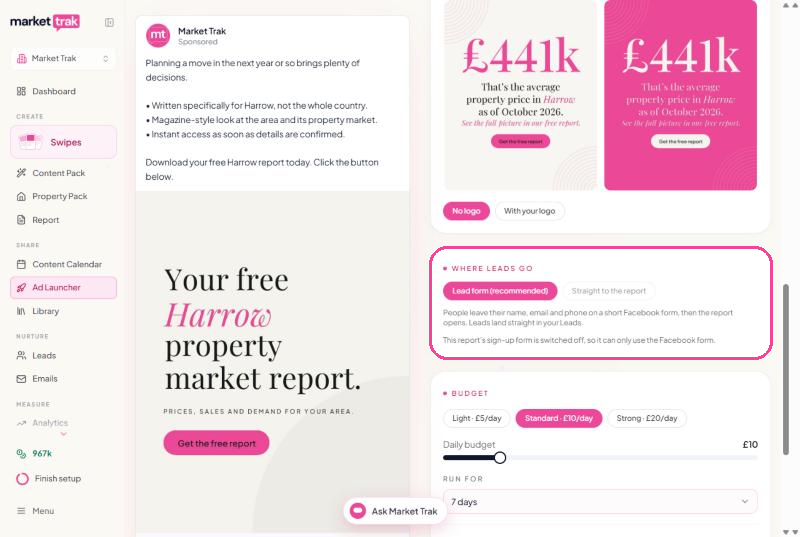
- Lead form (recommended): people leave their name, email and phone on a short Facebook form, which Facebook fills in for them, and a Read the report button opens the report straight away. Every person lands in your Leads, tagged with the report's area, and each one gets a thank-you email from you, "Here's your [area] market report", with a button to the report. You can change its wording, or turn it off, under Emails > Automatic (see Welcome emails).
- Straight to the report: the ad opens the report, and the report's own sign-up form asks for their details before they can read it. This is only available when that report has Lead capture switched on; otherwise people could read it without leaving their details, so the choice is greyed out.
How targeting works
These ads follow Facebook's Housing rules, the same as property ads. The ad is shown to people within 17 km of the centre of the area, the tightest radius Facebook allows for housing ads, with no age, gender or interest targeting. See How targeting works.
Managing your ads
Valuation and market report ads appear in Your ads alongside your property ads, labelled Valuation ad or Report ad. Valuation ads count the valuations they bring in; report ads count the people who asked for the report. Each card shows what each one cost you once Facebook's spend figures come in. You can pause, change the budget, extend or end them in exactly the same way as a property ad.